Configuration
Leaf routers configuration
In this example, the leaf routers of the network fabric use OSPF to exchange underlay routes information, and BGP to exchange EVPN L2 and L3 information.
Note
In this deployment guide, focusing on how to configure the HNA, the spines routers are omitted.
Warning
In production, it is advised to set ebgp-requires-policy
to true, and to configure relevant policies.
Customize and apply the following configuration (download link) on leaf1:
/ system license online serial HIDDEN
/ system hostname leaf1
/ system fast-path port pci-b0s4
/ system fast-path port pci-b0s5
/ vrf main interface physical eth1 port pci-b0s4
/ vrf main interface physical eth1 mtu 1600
/ vrf main interface physical eth1 ipv4 address 10.0.11.1/24
/ vrf main interface physical eth2 port pci-b0s5
/ vrf main interface physical eth2 mtu 1600
/ vrf main interface physical eth2 ipv4 address 10.0.21.1/24
/ vrf main interface loopback loop0 ipv4 address 10.0.0.201/32
/ vrf main routing bgp as 65500
/ vrf main routing bgp listen neighbor-range 10.0.0.0/16 neighbor-group HNAs
/ vrf main routing bgp router-id 10.0.0.201
/ vrf main routing bgp ebgp-requires-policy false
/ vrf main routing bgp neighbor-group HNAs remote-as 65500
/ vrf main routing bgp neighbor-group HNAs neighbor-description HNA
/ vrf main routing bgp neighbor-group HNAs update-source loop0
/ vrf main routing bgp neighbor-group HNAs address-family ipv4-unicast enabled false
/ vrf main routing bgp neighbor-group HNAs address-family ipv6-unicast enabled false
/ vrf main routing bgp neighbor-group HNAs address-family l2vpn-evpn route-reflector-client true
/ vrf main routing bgp neighbor-group HNAs track bfd
/ vrf main routing ospf
/ vrf main routing ospf router-id 10.0.0.201
/ vrf main routing ospf network 10.0.0.0/16 area 0
/ vrf main routing interface eth1 ip ospf track bfd
/ vrf main routing interface eth2 ip ospf track bfd
Note
Take care to at least update the license serial and the PCI bus addresses.
Do the same for the configuration of leaf2 (download link):
/ system license online serial HIDDEN
/ system hostname leaf2
/ system fast-path port pci-b0s4
/ system fast-path port pci-b0s5
/ vrf main interface physical eth1 port pci-b0s4
/ vrf main interface physical eth1 mtu 1600
/ vrf main interface physical eth1 ipv4 address 10.0.12.1/24
/ vrf main interface physical eth2 port pci-b0s5
/ vrf main interface physical eth2 mtu 1600
/ vrf main interface physical eth2 ipv4 address 10.0.22.1/24
/ vrf main interface loopback loop0 ipv4 address 10.0.0.202/32
/ vrf main routing bgp as 65500
/ vrf main routing bgp listen neighbor-range 10.0.0.0/16 neighbor-group HNAs
/ vrf main routing bgp router-id 10.0.0.202
/ vrf main routing bgp ebgp-requires-policy false
/ vrf main routing bgp neighbor-group HNAs remote-as 65500
/ vrf main routing bgp neighbor-group HNAs neighbor-description HNA
/ vrf main routing bgp neighbor-group HNAs update-source loop0
/ vrf main routing bgp neighbor-group HNAs address-family ipv4-unicast enabled false
/ vrf main routing bgp neighbor-group HNAs address-family ipv6-unicast enabled false
/ vrf main routing bgp neighbor-group HNAs address-family l2vpn-evpn route-reflector-client true
/ vrf main routing bgp neighbor-group HNAs track bfd
/ vrf main routing ospf
/ vrf main routing ospf router-id 10.0.0.202
/ vrf main routing ospf network 10.0.0.0/16 area 0
/ vrf main routing interface eth1 ip ospf track bfd
/ vrf main routing interface eth2 ip ospf track bfd
HNA configuration
Namespace
Create the hna namespace where the HNA pods will be spawned.
root@node1:~# kubectl create namespace hna
namespace/hna created
Bootstrap configuration
The bootstrap configuration on an HNA is typically used to enable the license. This initial configuration is saved as startup configuration in the pod filesystem, so it can be used as a starting point in the configuration template.
Note
Take care to set a valid license serial in the initial configuration.
Customize the hna-init-config.yaml file (download link) and apply it:
root@node1:~# kubectl create -n hna -f hna-init-config.yaml
secret/vsr-init-config created
Startup probe
In a ConfigMap, add a script that will be used as a startup probe by
the container: this script startup-probe.sh is executed by the
container runtime inside the container to check if it is ready
(download link):
ret=$(systemctl is-system-running)
if [ "$ret" = "running" ] || [ "$ret" = "degraded" ]; then
	exit 0
fi
Apply the ConfigMap like this (it will be used by the deployment
file later):
root@node1:~# kubectl create configmap -n hna startup-probe --from-file=startup-probe.sh=startup-probe.sh
HNA deployment
The HNA pod takes the role of the HBR (Host Based Router). It provides the network connectivity to the CNF Pods, through a virtio or a veth interface. It runs on each Kubernetes node, which means the deployment type is a DaemonSet.
As described in the nc-k8s-plugin documentation, the
multus-hna-hbr network must be present in the metadata annotations.
In the example below, the multus SR-IOV networks that corresponds to
the connections to leaf1 and leaf2 are respectively called
multus-sriov-1 and multus-sriov-2. You can get the name associated
to your Kubernetes cluster with the following command:
root@node1:~# kubectl get --show-kind network-attachment-definitions
Similarly, the SR-IOV resources are called sriov/sriov1 and
sriov/sriov2. You can get the name associated to your Kubernetes cluster
with the following command:
root@node1:~# kubectl get -o yaml -n kube-system configMap sriovdp-config
The content of the deployment file deploy-hna.yaml is shown below
(download link):
apiVersion: apps/v1
kind: DaemonSet
metadata:
  name: hna
  namespace: hna
spec:
  selector:
    matchLabels:
      role: hna
  template:
    metadata:
      labels:
        role: hna
      annotations:
         k8s.v1.cni.cncf.io/networks: multus-sriov-1,multus-sriov-2,multus-hna-hbr
    spec:
      restartPolicy: Always
      securityContext:
        appArmorProfile:
          type: Unconfined
        sysctls:
        - name: net.ipv4.conf.default.disable_policy
          value: "1"
        - name: net.ipv4.ip_local_port_range
          value: "30000 40000"
        - name: net.ipv4.ip_forward
          value: "1"
        - name: net.ipv6.conf.all.forwarding
          value: "1"
        - name: net.netfilter.nf_conntrack_events
          value: "1"
      containers:
      - image: download.6wind.com/vsr/x86_64-ce-vhost/3.12:3.12.0.ga
        imagePullPolicy: IfNotPresent
        name: hna
        startupProbe:
          exec:
            command: ["bash", "-c", "/bin/startup-probe"]
          initialDelaySeconds: 10
          failureThreshold: 20
          periodSeconds: 10
          timeoutSeconds: 9
        resources:
          limits:
            cpu: "2"
            memory: 2048Mi
            hugepages-2Mi: 1024Mi
            sriov/sriov1: 1
            sriov/sriov2: 1
            smarter-devices/ppp: 1
            nc-k8s-plugin.6wind.com/vhost-user-all: 1
          requests:
            cpu: "2"
            memory: 2048Mi
            hugepages-2Mi: 1024Mi
            sriov/sriov1: 1
            sriov/sriov2: 1
            smarter-devices/ppp: 1
            nc-k8s-plugin.6wind.com/vhost-user-all: 1
        env:
        - name: K8S_POD_NAME
          valueFrom:
            fieldRef:
              fieldPath: metadata.name
        securityContext:
          capabilities:
            add: ["NET_ADMIN", "NET_RAW", "SYS_ADMIN", "SYS_NICE", "IPC_LOCK", "NET_BROADCAST", "SYSLOG", "SYS_TIME"
                 , "SYS_RAWIO", "SYS_CHROOT"
                 ]
        volumeMounts:
        - mountPath: /dev/hugepages
          name: hugepage
        - mountPath: /dev/shm
          name: shm
        - mountPath: /tmp
          name: tmp
        - mountPath: /run
          name: run
        - mountPath: /run/lock
          name: run-lock
        - mountPath: /bin/startup-probe
          subPath: startup-probe.sh
          name: startup-probe
        - mountPath: /etc/init-config/config.cli
          subPath: vsr_init_config
          name: init-config
        stdin: true
        tty: true
      imagePullSecrets:
      - name: regcred
      volumes:
      - emptyDir:
          medium: HugePages
          sizeLimit: 2Gi
        name: hugepage
      - name: shm
        emptyDir:
          sizeLimit: "2Gi"
          medium: "Memory"
      - emptyDir:
          sizeLimit: "500Mi"
          medium: "Memory"
        name: tmp
      - emptyDir:
          sizeLimit: "200Mi"
          medium: "Memory"
        name: run
      - emptyDir:
          sizeLimit: "200Mi"
          medium: "Memory"
        name: run-lock
      - name: startup-probe
        configMap:
          name: startup-probe
          defaultMode: 0500
      - name: init-config
        secret:
          secretName: vsr-init-config
          defaultMode: 0400
Note
In addition to the multus SR-IOV networks and the SR-IOV resources that must be customized, other parameters of the deployment file can be adapted to your use-case (ex: CPUs, memory)
Apply the DaemonSet with the following command:
root@node1:~# kubectl apply -f deploy-hna.yaml
Once applied, the pods should be running:
root@node1:~# kubectl get pod -n hna -o wide
NAME        READY   STATUS    RESTARTS   AGE   IP             NODE                 NOMINATED NODE   READINESS GATES
hna-hzj7l   1/1     Running   0          31s   10.229.0.119   node1                <none>           <none>
hna-ltlzw   1/1     Running   0          31s   10.229.1.123   node2                <none>           <none>
HNA configuration template
The HNA Pods are configured automatically by the
hna-operator. The configuration is generated from a Jinja2 template.
See also
For detailed instructions, please refer to the HNA Configuration Template section of the nc-k8s-plugin documentation.
This template relies on the Kubernetes database (list of Pods, list of nodes, custom resources definitions, …) to generate a valid CLI configuration that depends on the properties of the CNFs that are running on node.
Hera are some details about the template used in this document:
The list of PCI ports to configure on the Host Network Accelerator pod are retrieved from the Pod annotations (
k8s.v1.cni.cncf.io/network-status).For each
hna_net(i.e. a network connection registered by a running CNF pod), a specific fast path and interface configuration is added, which depends on the interface kind (vethorvirtio-user).The tenants and its subnets are retrieved from CRDs. They are described in the next section.
Depending on the tenant of the CNF associated to the
hna_net, the interface is added into a bridge associated to a L2 network, inside a l3vrf corresponding to the tenant. A vxlan interface is connected to this bridge to provide L2 connectivity for this subnet.For each tenant, a bridge and a vxlan interface is also created in the same l3vrf, providing L3 connectivity (inter-subnet and inter-tenant).
An HNA identifier
hna_idis used to build a unique IP for the HNA Pod. It has to be set as a label on the HNA pod.A BGP configuration is used to peer with the leaf routers, to exchange EVPN information.
An OSPF configuration is used to peer with the leaf routers, to exchange underlay IP routes.
A KPI configuration is used to export metrics to an
influxdbPod on the Kubernetes cluster. This part is optional and can be removed.
The content of the configuration template hna-config-template.nc-cli
is shown below (download link):
{#
This configuration bridges the virtual ports of the same tenant, and
does BGP with the leaf routers.
#}

{# Enable license #}
load startup

{# Enable fast path #}
# Fast path
/ system fast-path enabled true
/ system fast-path core-mask fast-path max
/ system fast-path advanced power-mode eco
/ system fast-path advanced machine-memory 2048
/ system fast-path max-virtual-ports 16

    {% if "hna_id" not in hna_pod.metadata.labels %}
# No hna_id label on the hna pod
    {% else %}
        {% set hna_id = hna_pod.metadata.labels['hna_id'] | int %}

{# Parse network status annotation in hna pod to retrieve the PCI bus address of each iface, and configure it #}
# Physical ports
        {% set pci_ifaces = [] %}
        {% for sriov in hna_pod.metadata.annotations["k8s.v1.cni.cncf.io/network-status"] |
           parse_json |
           selectattr('device-info', 'defined') |
           selectattr('device-info.type', 'eq', 'pci') %}
            {% set pci_iface = sriov["device-info"]["pci"]["pci-address"] | pci2name %}
            {% set _ = pci_ifaces.append(pci_iface) %}
/ system fast-path port {{pci_iface}}
/ vrf main interface physical {{pci_iface}} description "physical index {{loop.index}}"
/ vrf main interface physical {{pci_iface}} port {{pci_iface}}
/ vrf main interface physical {{pci_iface}} mtu 1600
/ vrf main interface physical {{pci_iface}} ipv4 address 10.0.{{loop.index * 10 + hna_id}}.2/24
        {% endfor %}

{# For each virtual network connected to the HNA, configure the fpvhost interface, and store the tenant and subnet for it #}
        {% set local_tenants = {} %}
# Virtual ports
        {% for hna_net in hna_nets.values() | selectattr('kind', 'ne', 'hbr') %}
            {% if hna_net.kind == "veth" %}
/ system fast-path virtual-port infrastructure infra-{{hna_net.name}}
                {% set hna_net_iface = "veth-" + hna_net.name %}
/ vrf main interface infrastructure {{hna_net_iface}} port infra-{{hna_net.name}}
/ vrf main interface infrastructure {{hna_net_iface}} description "{{hna_net.pod_name}}"
            {% elif hna_net.kind == "vhost-user" %}
/ system fast-path virtual-port fpvirtio fpvirtio-{{hna_net.name}}
                {% if "queues" in hna_net.userdata %}
/ system fast-path virtual-port fpvirtio fpvirtio-{{hna_net.name}} queues {{hna_net.userdata.queues}}
                {% endif %}
                {% set hna_net_iface = "vir-" + hna_net.name %}
/ vrf main interface fpvirtio {{hna_net_iface}} port fpvirtio-{{hna_net.name}}
/ vrf main interface fpvirtio {{hna_net_iface}} description "{{hna_net.pod_name}}"
            {% elif hna_net.kind == "virtio-user" %}
/ system fast-path virtual-port fpvhost fpvhost-{{hna_net.name}}
                {% if "profile" in hna_net.userdata %}
/ system fast-path virtual-port fpvhost fpvhost-{{hna_net.name}} profile {{hna_net.userdata.profile}}
                {% endif %}
                {% if hna_net.userdata.socket_mode == "server" %}
/ system fast-path virtual-port fpvhost fpvhost-{{hna_net.name}} socket-mode client
                {% else %}
/ system fast-path virtual-port fpvhost fpvhost-{{hna_net.name}} socket-mode server
                {% endif %}
                {% set hna_net_iface = "vho-" + hna_net.name %}
/ vrf main interface fpvhost {{hna_net_iface}} port fpvhost-{{hna_net.name}}
/ vrf main interface fpvhost {{hna_net_iface}} description "{{hna_net.pod_name}}"
            {% endif %}
            {% set pod = pods[hna_net.pod_name] %}
            {% if 'tenant' in pod.metadata.labels and 'subnet' in pod.metadata.labels and 'ip' in pod.metadata.labels %}
                {% set tenant = pod.metadata.labels['tenant'] %}
                {% set subnet = pod.metadata.labels['subnet'] %}
                {% set ip = pod.metadata.labels['ip'] %}
                {% if tenant not in local_tenants %}
                    {% set _ = local_tenants.update({tenant: {}}) %}
                {% endif %}
                {% if subnet not in local_tenants[tenant] %}
                    {% set _ = local_tenants[tenant].update({subnet: {}}) %}
                {% endif %}
                {% set _ = local_tenants[tenant][subnet].update({hna_net_iface: {"name": hna_net_iface, "ip": ip, "port": hna_net.name}}) %}
            {% endif %}
        {% endfor %}

{# List tenants referenced by intertenant CRDs #}
        {% set local_intertenants = {} %}
        {% for intertenant in intertenants.values() %}
            {% set _ = local_intertenants.update({intertenant.spec.tenant1: True, intertenant.spec.tenant2: True}) %}
        {% endfor %}

{# For each tenant present locally and its subnet, configure the network #}
        {% for tenant in tenants.values()
           if tenant.metadata.name in local_tenants or tenant.metadata.name in local_intertenants %}
# -- Tenant {{tenant.metadata.name}}
/ vrf main l3vrf vrf{{tenant.spec.identifier}} description "tenant {{tenant.metadata.name}}"
/ vrf main l3vrf vrf{{tenant.spec.identifier}} table-id {{tenant.spec.identifier}}
/ vrf main l3vrf vrf{{tenant.spec.identifier}} routing bgp l3vni {{tenant.spec.identifier}}
/ vrf main l3vrf vrf{{tenant.spec.identifier}} routing bgp address-family ipv4-unicast l3vpn export route-target 65500:{{tenant.spec.identifier}}
/ vrf main l3vrf vrf{{tenant.spec.identifier}} routing bgp address-family ipv4-unicast l3vpn export route-distinguisher 65500:{{tenant.spec.identifier}}
/ vrf main l3vrf vrf{{tenant.spec.identifier}} routing bgp address-family ipv4-unicast l3vpn import route-target 65500:{{tenant.spec.identifier}}
/ vrf main l3vrf vrf{{tenant.spec.identifier}} routing bgp address-family ipv4-unicast redistribute connected
/ vrf main l3vrf vrf{{tenant.spec.identifier}} routing bgp address-family l2vpn-evpn advertisement ipv4-unicast
/ vrf main l3vrf vrf{{tenant.spec.identifier}} routing bgp address-family l2vpn-evpn auto-route-target rfc8365
/ vrf main l3vrf vrf{{tenant.spec.identifier}} routing bgp address-family l2vpn-evpn export route-distinguisher 65500:{{tenant.spec.identifier}}
/ vrf main l3vrf vrf{{tenant.spec.identifier}} routing bgp address-family l2vpn-evpn import
/ vrf main interface vxlan vx{{tenant.spec.identifier}} description "tenant {{tenant.metadata.name}}"
/ vrf main interface vxlan vx{{tenant.spec.identifier}} mtu 1500
/ vrf main interface vxlan vx{{tenant.spec.identifier}} vni {{tenant.spec.identifier}}
/ vrf main interface vxlan vx{{tenant.spec.identifier}} local 10.0.0.{{hna_id}}
/ vrf main interface vxlan vx{{tenant.spec.identifier}} link-interface loop0
/ vrf main interface vxlan vx{{tenant.spec.identifier}} learning false
            {% for subnet in subnets.values()
               if subnet.metadata.namespace == tenant.metadata.name %}
# Subnet {{subnet.metadata.name}}
/ vrf main l3vrf vrf{{tenant.spec.identifier}} interface bridge br{{subnet.spec.identifier}} description "subnet {{subnet.metadata.name}}"
/ vrf main l3vrf vrf{{tenant.spec.identifier}} interface bridge br{{subnet.spec.identifier}} ipv4 address {{subnet.spec.gateway}}/{{subnet.spec.prefixlen}}
/ vrf main l3vrf vrf{{tenant.spec.identifier}} interface bridge br{{subnet.spec.identifier}} ethernet mac-address 00:00:00:00:01:01
/ vrf main l3vrf vrf{{tenant.spec.identifier}} interface bridge br{{subnet.spec.identifier}} network-stack ipv4 arp-accept-gratuitous always
/ vrf main l3vrf vrf{{tenant.spec.identifier}} interface bridge br{{subnet.spec.identifier}} network-stack neighbor ipv4-base-reachable-time 30000
/ vrf main l3vrf vrf{{tenant.spec.identifier}} interface bridge br{{subnet.spec.identifier}} mtu 1550
                {% if tenant.metadata.name in local_tenants and subnet.metadata.name in local_tenants[tenant.metadata.name] %}
                    {% for link_iface in local_tenants[tenant.metadata.name][subnet.metadata.name].values() %}
/ vrf main l3vrf vrf{{tenant.spec.identifier}} interface bridge br{{subnet.spec.identifier}} link-interface {{link_iface.name}}
                    {% endfor %}
                {% endif %}
/ vrf main interface vxlan vx{{subnet.spec.identifier}} description "subnet {{subnet.metadata.name}}"
/ vrf main interface vxlan vx{{subnet.spec.identifier}} mtu 1500
/ vrf main interface vxlan vx{{subnet.spec.identifier}} vni {{subnet.spec.identifier}}
/ vrf main interface vxlan vx{{subnet.spec.identifier}} local 10.0.0.{{hna_id}}
/ vrf main interface vxlan vx{{subnet.spec.identifier}} link-interface loop0
/ vrf main interface vxlan vx{{subnet.spec.identifier}} learning false
/ vrf main l3vrf vrf{{tenant.spec.identifier}} interface bridge br{{subnet.spec.identifier}} link-interface vx{{subnet.spec.identifier}} learning false
            {% endfor %}
        {% endfor %}

{# For each tenant and subnet, configure the ACLs #}
/ system network-stack bridge call-ipv4-filtering true
/ vrf main firewall ipv4 filter forward policy drop
        {% for tenant in tenants.values()
           if tenant.metadata.name in local_tenants or tenant.metadata.name in local_intertenants %}
# -- Tenant {{tenant.metadata.name}}
            {% for subnet in subnets.values()
               if subnet.metadata.namespace == tenant.metadata.name %}
# - Subnet {{subnet.metadata.name}}
# filter by interface address
                {% if tenant.metadata.name in local_tenants and
                   subnet.metadata.name in local_tenants[tenant.metadata.name] %}
                    {% for link_iface in local_tenants[tenant.metadata.name][subnet.metadata.name].values() %}
/ vrf main firewall ipv4 mangle prerouting rule {{subnet.spec.identifier * 1000 + loop.index-}}
  {{' '}}inbound-bridge-port {{link_iface.name-}}
  {{' '}}source address not {{link_iface.ip-}}
  {{' '}}action drop
                    {% endfor %}
                {% endif %}
# intra-node traffic
                {% for acl in tenant.spec.get("acls", []) %}
/ vrf main firewall ipv4 filter forward rule {{subnet.spec.identifier * 1000 + 500 + loop.index-}}
  {{' '}}inbound-interface br{{subnet.spec.identifier-}}
  {% if acl.source or acl.sport %} source{% endif -%}
  {% if acl.source %} address {{acl.source}}{% endif -%}
  {% if acl.sport %} port {{acl.sport}}{% endif -%}
  {% if acl.destination or acl.dport %} destination{% endif -%}
  {% if acl.destination %} address {{acl.destination}}{% endif -%}
  {% if acl.dport %} port {{acl.dport}}{% endif -%}
  {% if acl.protocol %} protocol {{acl.protocol}}{% endif -%}
  {% if acl.conntrack %} conntrack state {{acl.conntrack}}{% endif -%}
  {{' '}}action {{acl.action}}
                {% endfor %}
/ vrf main firewall ipv4 filter forward rule {{subnet.spec.identifier * 1000 + 999-}}
  {{' '}}inbound-interface br{{subnet.spec.identifier-}}
  {{' '}}action {{tenant.spec.acl_policy}}
            {% endfor %}
# inter-node traffic
            {% for acl in tenant.spec.get("acls", []) %}
/ vrf main firewall ipv4 filter forward rule {{tenant.spec.identifier * 100000 + 99000 + loop.index-}}
  {{' '}}inbound-interface vrf{{tenant.spec.identifier-}}
  {% if acl.source or acl.sport %} source{% endif -%}
  {% if acl.source %} address {{acl.source}}{% endif -%}
  {% if acl.sport %} port {{acl.sport}}{% endif -%}
  {% if acl.destination or acl.dport %} destination{% endif -%}
  {% if acl.destination %} address {{acl.destination}}{% endif -%}
  {% if acl.dport %} port {{acl.dport}}{% endif -%}
  {% if acl.protocol %} protocol {{acl.protocol}}{% endif -%}
  {% if acl.conntrack %} conntrack state {{acl.conntrack}}{% endif -%}
  {{' '}}action {{acl.action}}
            {% endfor %}
/ vrf main firewall ipv4 filter forward rule {{tenant.spec.identifier * 100000 + 99999-}}
  {{' '}}inbound-interface vrf{{tenant.spec.identifier-}}
  {{' '}}action {{tenant.spec.acl_policy}}
        {% endfor %}

{# Configure route leaks from intertenant CRD #}
# Inter-tenants
        {% for intertenant in intertenants.values()
           if (intertenant.spec.tenant1 in local_tenants or intertenant.spec.tenant2 in local_tenants)
           and intertenant.spec.tenant1 in tenants
           and intertenant.spec.tenant2 in tenants
           and intertenant.spec.tenant1 + "/" + intertenant.spec.subnet1 in subnets
           and intertenant.spec.tenant2 + "/" + intertenant.spec.subnet2 in subnets %}
            {% set tenant1 = tenants[intertenant.spec.tenant1] %}
            {% set tenant2 = tenants[intertenant.spec.tenant2] %}
            {% set subnet1 = subnets[intertenant.spec.tenant1 + "/" + intertenant.spec.subnet1] %}
            {% set subnet2 = subnets[intertenant.spec.tenant2 + "/" + intertenant.spec.subnet2] %}
# {{intertenant.spec.tenant1}}/{{intertenant.spec.subnet1}} <-> {{intertenant.spec.tenant2}}/{{intertenant.spec.subnet2}}
/ routing ipv4-prefix-list pl{{tenant1.spec.identifier}}-export seq {{subnet1.spec.identifier}} address {{subnet1.spec.network}}/{{subnet1.spec.prefixlen}} policy permit
/ routing ipv4-prefix-list pl{{tenant1.spec.identifier}}-import seq {{subnet1.spec.identifier}} address {{subnet2.spec.network}}/{{subnet2.spec.prefixlen}} policy permit
/ routing ipv4-prefix-list pl{{tenant2.spec.identifier}}-export seq {{subnet2.spec.identifier}} address {{subnet2.spec.network}}/{{subnet2.spec.prefixlen}} policy permit
/ routing ipv4-prefix-list pl{{tenant2.spec.identifier}}-import seq {{subnet2.spec.identifier}} address {{subnet1.spec.network}}/{{subnet1.spec.prefixlen}} policy permit
/ routing route-map rm{{tenant1.spec.identifier}}-export seq {{subnet1.spec.identifier}} policy permit
/ routing route-map rm{{tenant1.spec.identifier}}-export seq {{subnet1.spec.identifier}} match ip address prefix-list pl{{tenant1.spec.identifier}}-export
/ routing route-map rm{{tenant1.spec.identifier}}-import seq {{subnet1.spec.identifier}} policy permit
/ routing route-map rm{{tenant1.spec.identifier}}-import seq {{subnet1.spec.identifier}} match ip address prefix-list pl{{tenant1.spec.identifier}}-import
/ routing route-map rm{{tenant1.spec.identifier}}-import seq {{subnet1.spec.identifier}} match source-l3vrf vrf{{tenant2.spec.identifier}}
/ routing route-map rm{{tenant2.spec.identifier}}-export seq {{subnet2.spec.identifier}} policy permit
/ routing route-map rm{{tenant2.spec.identifier}}-export seq {{subnet2.spec.identifier}} match ip address prefix-list pl{{tenant2.spec.identifier}}-export
/ routing route-map rm{{tenant2.spec.identifier}}-import seq {{subnet2.spec.identifier}} policy permit
/ routing route-map rm{{tenant2.spec.identifier}}-import seq {{subnet2.spec.identifier}} match ip address prefix-list pl{{tenant2.spec.identifier}}-import
/ routing route-map rm{{tenant2.spec.identifier}}-import seq {{subnet2.spec.identifier}} match source-l3vrf vrf{{tenant1.spec.identifier}}
/ vrf main l3vrf vrf{{tenant1.spec.identifier}} routing bgp address-family l2vpn-evpn advertisement ipv4-unicast route-map rm{{tenant1.spec.identifier}}-export
/ vrf main l3vrf vrf{{tenant1.spec.identifier}} routing bgp address-family ipv4-unicast l3vrf import l3vrf vrf{{tenant2.spec.identifier}}
/ vrf main l3vrf vrf{{tenant1.spec.identifier}} routing bgp address-family ipv4-unicast l3vrf import route-map rm{{tenant1.spec.identifier}}-import
/ vrf main l3vrf vrf{{tenant2.spec.identifier}} routing bgp address-family l2vpn-evpn advertisement ipv4-unicast route-map rm{{tenant2.spec.identifier}}-export
/ vrf main l3vrf vrf{{tenant2.spec.identifier}} routing bgp address-family ipv4-unicast l3vrf import l3vrf vrf{{tenant1.spec.identifier}}
/ vrf main l3vrf vrf{{tenant2.spec.identifier}} routing bgp address-family ipv4-unicast l3vrf import route-map rm{{tenant2.spec.identifier}}-import
        {% endfor %}

# Loopback
/ vrf main interface loopback loop0 ipv4 address 10.0.0.{{hna_id}}/32
/ vrf main interface loopback loop0 mtu 1600

# BGP
/ vrf main routing bgp as 65500
/ vrf main routing bgp router-id 10.0.0.{{hna_id}}
/ vrf main routing bgp ebgp-requires-policy false
/ vrf main routing bgp address-family l2vpn-evpn advertise-all-vni true
        {% for pci_iface in pci_ifaces %}
/ vrf main routing bgp neighbor 10.0.0.{{200 + loop.index}} remote-as 65500
/ vrf main routing bgp neighbor 10.0.0.{{200 + loop.index}} neighbor-description leaf-{{loop.index}}
/ vrf main routing bgp neighbor 10.0.0.{{200 + loop.index}} update-source loop0
/ vrf main routing bgp neighbor 10.0.0.{{200 + loop.index}} address-family ipv4-unicast enabled false
/ vrf main routing bgp neighbor 10.0.0.{{200 + loop.index}} address-family ipv6-unicast enabled false
/ vrf main routing bgp neighbor 10.0.0.{{200 + loop.index}} address-family l2vpn-evpn
/ vrf main routing bgp neighbor 10.0.0.{{200 + loop.index}} track bfd
        {% endfor %}

# OSPF
/ vrf main routing ospf router-id 10.0.0.{{hna_id}}
/ vrf main routing ospf network 10.0.0.0/16 area 0
        {% for pci_iface in pci_ifaces %}
/ vrf main routing interface {{pci_iface}} ip ospf track bfd
        {% endfor %}
    {% endif %}

# KPIs
    {% for pci_iface in pci_ifaces %}
/ vrf main kpi telegraf metrics monitored-interface vrf main name {{pci_iface}}
    {% endfor %}
    {% for hna_net_iface in hna_net_ifaces %}
/ vrf main kpi telegraf metrics monitored-interface vrf main name {{hna_net_iface}}
    {% endfor %}
/ vrf main kpi telegraf metrics metric network-nic-traffic-stats enabled true period 3
/ vrf main kpi telegraf interval 5
/ vrf main kpi telegraf influxdb-output url http://influxdb.monitoring:8086 database telegraf
To apply the template, run the following command:
root@node1:~# kubectl create configmap -n hna-operator hna-template --from-file=config.nc-cli=/root/hna-config-template.nc-cli
Network segmentation using CRDs
The tenants, subnets, and inter-tenant connections are configured through standard Kubernetes CRDs. This document gives an example of CRDs, but it is up to the user to define its own CRDs, containing the information required for its use-case. These CRDs are used in the Jinja template described in the previous section.
These CRDs are designed to configure the connection of the CNF pods as below:
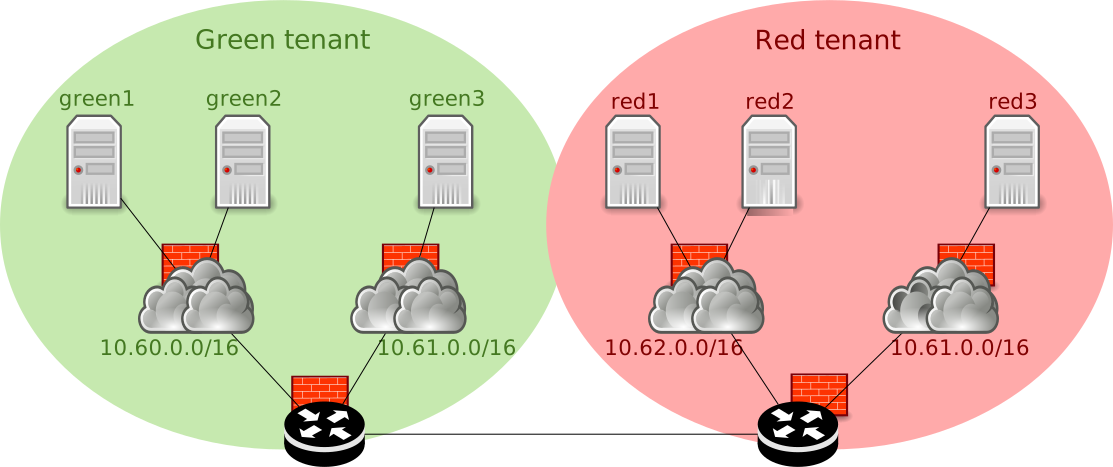
Logical view of the network.
Tenant CRD
The tenant CRD describes a tenants, and the ACLs that applies to it (download link):
---
apiVersion: apiextensions.k8s.io/v1
kind: CustomResourceDefinition
metadata:
  name: tenants.hna.6wind.com
spec:
  group: hna.6wind.com
  scope: Namespaced
  names:
    plural: tenants
    singular: tenant
    kind: Tenant
  versions:
    - name: v1
      served: true
      storage: true
      schema:
        openAPIV3Schema:
          type: object
          properties:
            spec:
              type: object
              properties:
                identifier:
                  type: integer
                  description: A unique identifier for the tenant. It is used in the network configuration for the l3vni and l3vrf table-id.
                  minimum: 100
                  maximum: 999
                description:
                  type: string
                  description: A text description giving details about this tenant
                acl_policy:
                  type: string
                  enum: [accept, drop]
                  description: The default action if no ACL match
                acls:
                  type: array
                  description: A list of ACLs applied to this tenant
                  items:
                    type: object
                    properties:
                      source:
                        type: string
                        description: The optional IPv4 source address or network
                      destination:
                        type: string
                        description: The optional IPv4 destination address or network
                      sport:
                        type: integer
                        minimum: 1
                        maximum: 65534
                        description: The optional source port
                      dport:
                        type: integer
                        minimum: 1
                        maximum: 65534
                        description: The optional destination port
                      action:
                        type: string
                        enum: [accept, drop]
                        description: The action to execute for this ACL
                      conntrack:
                        type: string
                        enum: [new, established, related, invalid]
                        description: The optional conntrack state
                      protocol:
                        type: string
                        enum: [ah, esp, gre, icmp, ipip, l2tp, sctp, tcp, udp, vrrp]
                        description: The optional protocol
                      description:
                        type: string
                        description: A text description giving details about this ACL
                    required:
                      - action
              required:
                - acl_policy
      selectableFields:
        - jsonPath: .spec.identifier
      additionalPrinterColumns:
        - jsonPath: .spec.identifier
          name: Identifier
          type: integer
---
apiVersion: "hna.6wind.com/v1"
kind: Tenant
metadata:
  name: green
spec:
  description: "For the green tenant, everything is allowed inside 10.60.
    A VM on 10.60 can connect to the port 5000 of a machine on 10.61.
    A VM on 10.60 can also connect to the 10.62 of the red tenant, on port 6000."
  identifier: 100
  acl_policy: drop
  acls:
    - source: "10.60.0.0/16"
      destination: "10.60.0.0/16"
      action: "accept"
      description: "Accept all traffic on the 10.60 subnet"
    - source: "10.61.0.0/16"
      destination: "10.60.0.0/16"
      protocol: "icmp"
      action: "accept"
      description: "Accept icmp from 10.60 to 10.61"
    - source: "10.60.0.0/16"
      destination: "10.61.0.0/16"
      protocol: "icmp"
      action: "accept"
      description: "Accept icmp from 10.61 to 10.60"
    - source: "10.60.0.0/16"
      destination: "10.61.0.0/16"
      protocol: "tcp"
      dport: 5000
      conntrack: "new"
      action: "accept"
      description: "Accept TCP port 5000 new connections from 10.60 to 10.61"
    - source: "10.62.0.0/16"
      destination: "10.60.0.0/16"
      protocol: "icmp"
      action: "accept"
      description: "Accept icmp from the 10.62 subnet of the red tenant to the 10.60"
    - source: "10.60.0.0/16"
      destination: "10.62.0.0/16"
      protocol: "icmp"
      action: "accept"
      description: "Accept icmp from the 10.60 to the 10.62 subnet of the red tenant"
    - source: "10.60.0.0/16"
      destination: "10.62.0.0/16"
      protocol: "tcp"
      dport: 6000
      conntrack: "new"
      action: "accept"
      description: "Accept TCP port 6000 new connections from 10.60 to 10.62 of the red tenant"
    - conntrack: "established"
      action: "accept"
      description: "Accept established connections"
---
apiVersion: "hna.6wind.com/v1"
kind: Tenant
metadata:
  name: red
spec:
  description: "For the red tenant, there is no ACL: everything is accepted, including inter-tenant."
  identifier: 101
  acl_policy: accept
Apply it like this:
admin@k8s:~$ kubectl create -f tenant-crd.yaml
The tenant CRDs must be configured in the default namespace.
Subnet CRD
The subnet CRD describes the subnets that are attached to a tenant (download link):
---
apiVersion: apiextensions.k8s.io/v1
kind: CustomResourceDefinition
metadata:
  name: subnets.hna.6wind.com
spec:
  group: hna.6wind.com
  scope: Namespaced
  names:
    plural: subnets
    singular: subnet
    kind: Subnet
  versions:
  - name: v1
    served: true
    storage: true
    schema:
      openAPIV3Schema:
        type: object
        properties:
          spec:
            type: object
            properties:
              network:
                type: string
                description: The IPv4 network subnet.
              prefixlen:
                type: integer
                description: The IPv4 prefix length.
                minimum: 16
                maximum: 32
              gateway:
                type: string
                description: The IPv4 address of the gateway on the subnet.
              identifier:
                type: integer
                description: A unique identifier for the subnet. It is used in the network configuration for the l2vni.
                minimum: 10000
                maximum: 99999
              description:
                type: string
                description: A text description giving details about this subnet
    selectableFields:
    - jsonPath: .spec.network
    - jsonPath: .spec.prefixlen
    - jsonPath: .spec.gateway
    - jsonPath: .spec.identifier
    additionalPrinterColumns:
    - jsonPath: .spec.network
      name: Network
      type: string
    - jsonPath: .spec.prefixlen
      name: Prefixlen
      type: integer
    - jsonPath: .spec.gateway
      name: Gateway
      type: string
    - jsonPath: .spec.identifier
      name: Identifier
      type: integer
---
apiVersion: "hna.6wind.com/v1"
kind: Subnet
metadata:
  name: green-10-60
  namespace: green
spec:
  network: "10.60.0.0"
  prefixlen: 16
  gateway: "10.60.0.254"
  identifier: 10000
  description: "Frontend network."
---
apiVersion: "hna.6wind.com/v1"
kind: Subnet
metadata:
  name: green-10-61
  namespace: green
spec:
  network: "10.61.0.0"
  prefixlen: 16
  gateway: "10.61.0.254"
  identifier: 10001
  description: "Backend network."
---
apiVersion: "hna.6wind.com/v1"
kind: Subnet
metadata:
  name: red-10-61
  namespace: red
spec:
  network: "10.61.0.0"
  prefixlen: 16
  gateway: "10.61.0.254"
  identifier: 10101
  description: "infra network."
---
apiVersion: "hna.6wind.com/v1"
kind: Subnet
metadata:
  name: red-10-62
  namespace: red
spec:
  network: "10.62.0.0"
  prefixlen: 16
  gateway: "10.62.0.254"
  identifier: 10100
  description: "Another infra network."
Apply it like this:
admin@k8s:~$ kubectl create -f subnet-crd.yaml
The subnet CRDs must be configured in the tenant namespace.
Inter-tenant CRD
The inter-tenant CRD describes how 2 tenants are connected together (download link):
---
apiVersion: apiextensions.k8s.io/v1
kind: CustomResourceDefinition
metadata:
  name: intertenants.hna.6wind.com
spec:
  group: hna.6wind.com
  scope: Namespaced
  names:
    plural: intertenants
    singular: intertenant
    kind: Intertenant
  versions:
  - name: v1
    served: true
    storage: true
    schema:
      openAPIV3Schema:
        type: object
        properties:
          spec:
            type: object
            properties:
              tenant1:
                type: string
                description: The name of the first tenant
              tenant2:
                type: string
                description: The name of the second tenant
              subnet1:
                type: string
                description: The name of the first tenant subnet
              subnet2:
                type: string
                description: The name of the second tenant subnet
              description:
                type: string
                description: A text description giving details about this intertenant connection
            required:
              - tenant1
              - tenant2
              - subnet1
              - subnet2
    selectableFields:
    - jsonPath: .spec.tenant1
    - jsonPath: .spec.tenant2
    - jsonPath: .spec.subnet1
    - jsonPath: .spec.subnet2
    additionalPrinterColumns:
    - jsonPath: .spec.tenant1
      name: Tenant1
      type: string
    - jsonPath: .spec.tenant2
      name: Tenant2
      type: string
    - jsonPath: .spec.subnet1
      name: Subnet1
      type: string
    - jsonPath: .spec.subnet2
      name: Subnet2
      type: string
---
apiVersion: "hna.6wind.com/v1"
kind: Intertenant
metadata:
  name: green-10-60-to-red-10-62
spec:
  tenant1: "green"
  tenant2: "red"
  subnet1: "green-10-60"
  subnet2: "red-10-62"
  description: "Green to red inter-tenant."
Apply it like this:
admin@k8s:~$ kubectl create -f intertenant-crd.yaml
The intertenant CRDs must be configured in the default namespace.
HNA operator configuration
The use of CRDs implies few modifications in the default HNA operator configuration.
Update cluster role
A default ClusterRole called hna-operator-cluster-role, grants the
HNA operator the authorizations that are required to monitor Kubernetes
objects.
To monitor these new CRDs, it has to be updated, as below (download link):
[
  {
    "op": "add",
    "path": "/rules/-",
    "value": {
      "apiGroups": ["hna.6wind.com"],
      "resources": ["tenants", "subnets", "intertenants"],
      "verbs": ["get", "watch", "list"]
    }
  }
]
Apply it like this:
admin@k8s:~$ kubectl patch clusterrole hna-operator-cluster-role --type=json --patch-file=clusterrole-patch.json
Patch HNA operator daemonset
To instruct the operator to monitor these new CRDs, the hna-operator
daemonset must be patched (download link):
spec:
  template:
    spec:
      containers:
      - name: hna-operator
        command:
        - /hna-operator
        - --log-level
        - INFO
        - --hna-pod-selector
        - role=hna
        - --watch-crd
        - api=hna.6wind.com/v1,kind=Subnet,namespace=*,alias=subnets
        - --watch-crd
        - api=hna.6wind.com/v1,kind=Tenant,namespace=default,alias=tenants
        - --watch-crd
        - api=hna.6wind.com/v1,kind=Intertenant,namespace=default,alias=intertenants
Apply it like this:
admin@k8s:~$ kubectl patch -n hna-operator daemonset hna-operator --patch-file=/root/hna-operator-patch.yaml
CNFs configuration
Namespaces
Create the green and red namespaces where the CNF pods will be spawned.
root@node1:~# kubectl create namespace green
namespace/green created
root@node1:~# kubectl create namespace red
namespace/red created
Boostrap configuration
The way CNFs are configured in a production environment is out-of-scope of this document.
In this deployment example, the CNFs run a Virtual Service Router. The configuration is
generated thanks to an initContainer that runs the below script, which
generates a startup configuration inside the container in
/etc/init-config/config.cli, based on environment variables passed by
Kubernetes. This CLI file is automatically applied when the Virtual Service Router container
starts.
To demonstrate the 2 interface kinds, the red pods use veth based
interfaces, while green ones use virtio based interfaces. The
dataplane IP addresses are simply generated using the pod identifier.
The cnf-bootstrap.py python script (download link):
#!/usr/bin/env python3
# Copyright 2025 6WIND S.A.

"""
This script is exported by Kubernetes in the VSR filesystem for the greenX and redX pods. It
is used to generate the startup configuration.
"""

import json
import os
import re
import subprocess
import sys

BUS_ADDR_RE = re.compile(r'''
    ^
    (?P<domain>([\da-f]+)):
    (?P<bus>([\da-f]+)):
    (?P<slot>([\da-f]+))\.
    (?P<func>(\d+))
    $
    ''', re.VERBOSE | re.IGNORECASE)

ADDRS = {
    "green1": "10.60.0.1",
    "green2": "10.60.0.2",
    "green3": "10.61.0.3",
    "red1": "10.62.0.1",
    "red2": "10.62.0.2",
    "red3": "10.61.0.3",
}

def bus_addr_to_name(bus_addr):
    """
    Convert a PCI bus address into a port name as used in nc-cli.
    """
    match = BUS_ADDR_RE.match(bus_addr)
    if not match:
        raise ValueError('pci bus address %s does not match regexp' % bus_addr)

    d = match.groupdict()
    domain = int(d['domain'], 16)
    bus = int(d['bus'], 16)
    slot = int(d['slot'], 16)
    func = int(d['func'], 10)

    name = 'pci-'
    if domain != 0:
        name += 'd%d' % domain
    name += 'b%ds%d' % (bus, slot)
    if func != 0:
        name += 'f%d' % func

    return name

def get_env_vm():
    with open('/run/init-env.json', encoding='utf-8') as f:
        env = json.load(f)
    env['HNA_IFNAME'] = subprocess.run(
        "ip -json -details link | jq --raw-output "
        "'.[] | select(has(\"linkinfo\") | not) | "
        "select(.address | match(\"00:09:c0\")) | .ifname'",
        shell=True, check=True, capture_output=True, text=True).stdout.strip()
    pci_addr = subprocess.run(
        rf"ethtool -i {env['HNA_IFNAME']} | sed -n 's,^bus-info: \(.*\)$,\1,p'",
        shell=True, check=True, capture_output=True, text=True).stdout.strip()
    env['HNA_PCIADDR'] = bus_addr_to_name(pci_addr)
    return env

def get_env_container():
    if os.getpid() == 1:
        env = dict(os.environ)
    else:
        with open('/proc/1/environ', encoding='utf-8') as f:
            data = f.read()
        env = dict((var.split('=') for var in data.split('\x00') if var))

    env['K8S_POD_ID'] = int(re.sub('[^0-9]', '', env['K8S_POD_ROLE']))
    env['DEFAULT_ROUTE'] = subprocess.run(
        'ip -j route get 8.8.8.8 | jq -r .[0].gateway', shell=True,
        check=True, capture_output=True, text=True).stdout.strip()
    env['VETH_INFRA_ID'] = subprocess.run(
        "ip -j link | jq --raw-output "
        "'(.[] | select(.ifname | match(\"veth-[0-9a-f]{10}\"))) | .ifalias'",
        shell=True, check=True, capture_output=True, text=True).stdout.strip()
    return env

def get_env():
    if os.path.exists('/run/init-env.json'):
        env = get_env_vm()
    else:
        env = get_env_container()
    env['K8S_POD_ID'] = int(re.sub('[^0-9]', '', env['K8S_POD_ROLE']))
    return env

def gen_green_config(env):
    mac = f"de:ad:de:80:00:{env['K8S_POD_ID']:02x}"
    addr = ADDRS.get(env['K8S_POD_ROLE'])
    gw = re.sub("[0-9]+$", "254", addr)
    conf = ""
    if 'HNA_PCIADDR' in env:
        conf += """\
/ vrf main interface physical eth1 ethernet mac-address {mac}
/ vrf main interface physical eth1 port {HNA_PCIADDR}
/ vrf main interface physical eth1 ipv4 address {addr}/16
/ system fast-path port {HNA_PCIADDR}
"""
    else:
        conf += """\
/ vrf main interface fpvirtio eth1 ethernet mac-address {mac}
/ vrf main interface fpvirtio eth1 port fpvirtio-0
/ vrf main interface fpvirtio eth1 ipv4 address {addr}/16
/ system fast-path virtual-port fpvirtio fpvirtio-0
/ system fast-path max-virtual-ports 1
"""
    conf += """\
/ system fast-path advanced machine-memory 2048
/ system fast-path advanced power-mode eco
/ system license online serial HIDDEN
/ vrf main routing static ipv4-route 10.0.0.0/8 next-hop {gw}
"""

    return conf.format(**env, mac=mac, addr=addr, gw=gw)

def gen_red_config(env):
    mac = f"de:ad:de:80:01:{env['K8S_POD_ID']:02x}"
    addr = ADDRS.get(env['K8S_POD_ROLE'])
    gw = re.sub("[0-9]+$", "254", addr)
    return """\
cmd license file import content {license_data} serial {license_serial} | ignore-error
/ vrf main interface infrastructure eth1 ethernet mac-address {mac}
/ vrf main interface infrastructure eth1 port {VETH_INFRA_ID}
/ vrf main interface infrastructure eth1 ipv4 address {addr}/16
/ system fast-path virtual-port infrastructure {VETH_INFRA_ID}
/ system fast-path advanced machine-memory 2048
/ system fast-path advanced power-mode eco
/ system license online serial HIDDEN
/ vrf main routing static ipv4-route 10.0.0.0/8 next-hop {gw}
""".format(**env, mac=mac, addr=addr, gw=gw)

def gen_config():
    env = get_env()
    if 'green' in env['K8S_POD_ROLE']:
        return gen_green_config(env)
    return gen_red_config(env)

def main():
    config = gen_config()
    if config[-1] != '\n':
        config += '\n'

    os.makedirs('/etc/init-config', exist_ok=True)
    with open('/etc/init-config/config.cli', 'w', encoding='utf-8') as f:
        f.write(config)
    if os.getpid() != 1:
        sys.stdout.write(config)

    return 0

if __name__ == '__main__':
    sys.exit(main())
Note
Take care to at least update the license serial.
To store this in a ConfigMap, run the following command on the Kubernetes
control plane:
root@node1:~# kubectl create configmap -n green cnf-bootstrap-config --from-file=cnf-bootstrap.py=/root/cnf-bootstrap.py
root@node1:~# kubectl create configmap -n red cnf-bootstrap-config --from-file=cnf-bootstrap.py=/root/cnf-bootstrap.py
CNF Deployment
Now you can deploy the CNF Pods: green1, green2, green3,
red1, red2 and red3. The green* Pods use a virtio
connection, while the red* Pods use a veth connection.
In this document, we use a deployment file for each CNF to ease the
placement of Pods on the different nodes: green1, green2, and
red1 will have an affinity to node1, while the other ones will have
an affinity to node2.
Some labels are set in the deployment file and will be added to the CNF pod, as they are used by the Jinja configuration template:
“tenant”: the name of the tenant for this pod, it must be the same as the pod namespace.
“subnet”: the name of the subnet for this pod.
“ip”: the IPv4 address affected to this pod.
The template also requires that the pod resides in a namespace that corresponds to its tenant (i.e. namespace name is the same than tenant name).
The content of the deployment file deploy-green1.yaml is shown below
(download link):
apiVersion: apps/v1
kind: Deployment
metadata:
  name: green1
  namespace: green
spec:
  replicas: 1
  selector:
    matchLabels:
      role: green1
  template:
    metadata:
      labels:
        role: green1
        tenant: green
        subnet: green-10-60
        ip: 10.60.0.1
      annotations:
        k8s.v1.cni.cncf.io/networks: default/multus-hna-virtio-user
    spec:
      affinity:
        nodeAffinity:
          requiredDuringSchedulingIgnoredDuringExecution:
            nodeSelectorTerms:
            - matchExpressions:
              - key: kubernetes.io/hostname
                operator: In
                values:
                - node1
      restartPolicy: Always
      securityContext:
        appArmorProfile:
          type: Unconfined
        sysctls:
        - name: net.ipv4.conf.default.disable_policy
          value: "1"
        - name: net.ipv4.ip_local_port_range
          value: "30000 40000"
        - name: net.ipv4.ip_forward
          value: "1"
        - name: net.ipv6.conf.all.forwarding
          value: "1"
        - name: net.netfilter.nf_conntrack_events
          value: "1"
      initContainers:
      - name: bootstrap
        image: download.6wind.com/vsr/x86_64-ce/3.12:3.12.0.ga
        command: ["/sbin/bootstrap"]
        resources:
          limits:
            cpu: "2"
            memory: 2048Mi
            hugepages-2Mi: 1024Mi
            nc-k8s-plugin.6wind.com/virtio-user: 1
          requests:
            cpu: "2"
            memory: 2048Mi
            hugepages-2Mi: 1024Mi
            nc-k8s-plugin.6wind.com/virtio-user: 1
        env:
        - name: K8S_NODE_NAME
          valueFrom:
            fieldRef:
              fieldPath: spec.nodeName
        - name: K8S_POD_NAME
          valueFrom:
            fieldRef:
              fieldPath: metadata.name
        - name: K8S_POD_ROLE
          value: green1
        - name: K8S_POD_IP
          valueFrom:
            fieldRef:
              fieldPath: status.podIP
        - name: K8S_POD_CPU_REQUEST
          valueFrom:
            resourceFieldRef:
              resource: requests.cpu
        - name: K8S_POD_MEM_REQUEST
          valueFrom:
            resourceFieldRef:
              resource: requests.memory
        volumeMounts:
        - mountPath: /sbin/bootstrap
          subPath: cnf-bootstrap.py
          name: bootstrap
        - mountPath: /etc/init-config
          name: init-config
      containers:
      - image: download.6wind.com/vsr/x86_64-ce/3.12:3.12.0.ga
        imagePullPolicy: IfNotPresent
        name: green1
        startupProbe:
          exec:
            command: ["bash", "-c", "/bin/startup-probe"]
          initialDelaySeconds: 10
          failureThreshold: 20
          periodSeconds: 10
          timeoutSeconds: 9
        resources:
          limits:
            cpu: "2"
            memory: 2048Mi
            hugepages-2Mi: 1024Mi
            smarter-devices/ppp: 1
            smarter-devices/vhost-net: 1
            smarter-devices/net_tun: 1
            nc-k8s-plugin.6wind.com/virtio-user: 1
          requests:
            cpu: "2"
            memory: 2048Mi
            hugepages-2Mi: 1024Mi
            smarter-devices/ppp: 1
            smarter-devices/vhost-net: 1
            smarter-devices/net_tun: 1
            nc-k8s-plugin.6wind.com/virtio-user: 1
        env:
        - name: K8S_POD_NAME
          valueFrom:
            fieldRef:
              fieldPath: metadata.name
        securityContext:
          capabilities:
            add: ["NET_ADMIN", "NET_RAW", "SYS_ADMIN", "SYS_NICE", "IPC_LOCK", "NET_BROADCAST", "SYSLOG", "SYS_TIME"
                 , "SYS_RAWIO", "SYS_CHROOT"
                 ]
        volumeMounts:
        - mountPath: /dev/hugepages
          name: hugepage
        - mountPath: /dev/shm
          name: shm
        - mountPath: /tmp
          name: tmp
        - mountPath: /run
          name: run
        - mountPath: /run/lock
          name: run-lock
        - mountPath: /bin/startup-probe
          subPath: startup-probe.sh
          name: startup-probe
        - mountPath: /etc/init-config
          name: init-config
        stdin: true
        tty: true
      imagePullSecrets:
      - name: regcred
      volumes:
      - emptyDir:
          medium: HugePages
          sizeLimit: 2Gi
        name: hugepage
      - name: shm
        emptyDir:
          sizeLimit: "2Gi"
          medium: "Memory"
      - emptyDir:
          sizeLimit: "500Mi"
          medium: "Memory"
        name: tmp
      - emptyDir:
          sizeLimit: "200Mi"
          medium: "Memory"
        name: run
      - emptyDir:
          sizeLimit: "200Mi"
          medium: "Memory"
        name: run-lock
      - name: bootstrap
        configMap:
          name: cnf-bootstrap-config
          defaultMode: 0500
      - name: startup-probe
        configMap:
          name: startup-probe
          defaultMode: 0500
      - name: init-config
        emptyDir:
          sizeLimit: "10Mi"
          medium: "Memory"
To apply the deployment file, run the following command:
root@node1:~# kubectl apply -f deploy-green1.yaml
After some time, the pod should be visible as “Running”:
root@node1:~# kubectl get pod -n green
NAME                      READY   STATUS    RESTARTS   AGE
green1-75667cbd6f-8kn74   1/1     Running   0          39s
Login to the pod with kubectl exec -n green -it POD_NAME -- login
(admin/admin is the default login/password), and list interfaces:
green1-75667cbd6f-8kn74> show interface
Name   State L3vrf   IPv4 Addresses  IPv6 Addresses               Description
====   ===== =====   ==============  ==============               ===========
lo     UP    default 127.0.0.1/8     ::1/128                      loopback_main
eth0   UP    default 10.229.0.126/24 fe80::c437:61ff:feb5:165c/64 infra-eth0
eth1   UP    default 10.60.0.1/16    fe80::dcad:deff:fe80:1/64
fptun0 UP    default                 fe80::6470:74ff:fe75:6e30/64
eth0is the primary CNIeth1is the virtio interface connected to the HNA
Note
eth1 may take some time to appear, since it requires to
start the fast path.
The content of other deployment files is very similar (only changes are
the pod name, the node affinity, the tenant, and the hna_net
kind). Here are the download links for each of them:
deploy-green1.yaml: (download link)deploy-green2.yaml: (download link)deploy-green3.yaml: (download link)deploy-red1.yaml: (download link)deploy-red2.yaml: (download link)deploy-red3.yaml: (download link)
VNF Deployment with Kubevirt
KubeVirt is an open-source project that lets you run VMs alongside containers in a Kubernetes cluster. You can use KubeVirt to deploy your network function as a VM, and connect it to the HNA using Virtio interfaces:
on VNF side, a Virtio PCI interface will be used,
on HNA side, a Vhost-user interface will be used.
Only Virtio is supported by the HNA CNI when using a VM. The use of Veth interfaces is not possible. So in our example, only the green pods can be instantiated as a VM.
This section explains how to deploy your Virtual Service Router as a VNF and connect it to the HNA. It requires the installation of a hook sidecar script, whose role is to add the VNF Virtio PCI ports connected to the HNA into the VM configuration, by modifying the libvirt XML domain description.
See also
Refer to the KubeVirt Installation section of the 6WIND HNA documentation for details about KubeVirt installation and configuration for HNA.
Refer to the kubevirt section of the nc-k8s-plugin documentation to deploy the hook sidecar script.
Load the hook sidecar script retrieved from nc-k8s-plugin documentation into a ConfigMap:
# kubectl create configmap -n green kubevirt-sidecar --from-file=kubevirt_sidecar.py=/path/to/kubevirt_sidecar.py
# kubectl create configmap -n red kubevirt-sidecar --from-file=kubevirt_sidecar.py=/path/to/kubevirt_sidecar.py
Then, create a new NetworkAttachmentDefinition with the following
content (download link):
apiVersion: "k8s.cni.cncf.io/v1"
kind: NetworkAttachmentDefinition
metadata:
  name: multus-hna-virtio-user-kubevirt
  annotations:
    k8s.v1.cni.cncf.io/resourceName: nc-k8s-plugin.6wind.com/virtio-user
spec:
  config: '{
  "cniVersion": "1.0.0",
  "name": "multus-hna-virtio-user-kubevirt",
  "type": "hna-cni",
  "kind": "virtio-user",
  "capabilities": {"CNIDeviceInfoFile": true, "deviceID": true},
  "log-level": "INFO",
  "log-file": "stderr",
  "userdata": {
    "socket_mode" : "server"
  }
}'
This NetworkAttachmentDefinition is similar to the default one
provided in nc-k8s-plugin, except that it includes a userdata
specifying a socket mode. This user data is used by the HNA
configuration template.
To run a VM, a VirtualMachine is expected by KubeVirt. The content
of this file, deploy-kubevirt-green1.yaml is shown below (download
link):
apiVersion: kubevirt.io/v1
kind: VirtualMachine
metadata:
  name: green1
  namespace: green
spec:
  runStrategy: Always
  template:
    metadata:
      annotations:
        hooks.kubevirt.io/hookSidecars:  >
          [
            {
              "args": ["--version", "v1alpha3"],
              "image": "quay.io/kubevirt/sidecar-shim:v1.5.2",
              "configMap": {"name": "kubevirt-sidecar", "key": "kubevirt_sidecar.py", "hookPath": "/usr/bin/onDefineDomain"}
            }
          ]
        k8s.v1.cni.cncf.io/networks: default/multus-hna-virtio-user-kubevirt
      labels:
        kubevirt.io/domain: green1
        role: green1
        tenant: green
        subnet: green-10-60
        ip: 10.60.0.1
    spec:
      nodeSelector:
        kubernetes.io/hostname: vm-k8s-hypervisor
      domain:
        cpu:
          sockets: 1
          cores: 1
          threads: 2
          dedicatedCpuPlacement: true
        devices:
          disks:
            - name: ctdisk
              disk: {}
          filesystems:
            - name: bootstrap
              virtiofs: {}
          interfaces:
            - name: default
              macAddress: de:ad:de:01:02:03
              masquerade: {}
        resources:
          requests:
            memory: 2048Mi
            nc-k8s-plugin.6wind.com/virtio-user: '1'
          limits:
            memory: 2048Mi
            nc-k8s-plugin.6wind.com/virtio-user: '1'
        memory:
          hugepages:
            pageSize: "2Mi"
      networks:
        - name: default
          pod: {}
      volumes:
      - name: ctdisk
        containerDisk:
          image: download.6wind.com/vsr/x86_64/3.12:3.12.0.ga
      - name: bootstrap
        configMap:
          name: cnf-bootstrap-config
      - name: cloudinitdisk
        cloudInitNoCloud:
          userData: |-
            #cloud-config
            bootcmd:
              - "echo '{ \"K8S_POD_ROLE\": \"green1\" }' > /run/init-env.json"
              - "mkdir /run/bootstrap_script"
              - "mount -t virtiofs bootstrap /run/bootstrap_script"
              - "mkdir /etc/init-config"
              - "python3 /run/bootstrap_script/cnf-bootstrap.py"
To apply the deployment file, run the following command:
root@node1:~# kubectl apply -f deploy-kubevirt-green1.yaml
After some time, the pod should be visible as “Running”. Note that KubeVirt creates several containers in the Pod (here, 6):
root@node1:~# kubectl get pod -n green
NAME                         READY   STATUS    RESTARTS   AGE
virt-launcher-green1-7nwdj   6/6     Running   0          20m
Login to the pod with virtctl console green1 (admin/admin is the
default login/password), and list interfaces:
green1-vm-kubevirt> show interface
Name   State L3vrf   IPv4 Addresses IPv6 Addresses               Description
====   ===== =====   ============== ==============               ===========
lo     UP    default 127.0.0.1/8    ::1/128                      loopback_main
eth0   UP    default 10.0.2.2/24    fe80::dcad:deff:fe01:203/64
eth1   UP    default 10.60.0.1/16   fe80::dcad:deff:fe80:1/64
fptun0 UP    default                fe80::6470:74ff:fe75:6e30/64
eth0is the primary CNIeth1is the virtio interface connected to the HNA
Note
eth1 may take some time to appear, since it requires to
start the fast path.