BGP EVPN
Overview
BGP Ethernet VPN (EVPN) delivers a control-plane service for Layer-2 VPN. L2VPN is a type of VPN that connects multiple Layer-2 (Ethernet) segments across a Layer-3 IP network. It achieves this by encapsulating Ethernet frames within a transport protocol that can traverse IP networks. While various encapsulation methods have been used historically, Virtual Extensible LAN (VXLAN) has become the industry standard (see RFC 7348). VXLAN is specifically designed for Ethernet frame transport and avoids the complexity of MPLS-based solutions. It operates as a UDP-based Layer 4 protocol, enabling seamless deployment over any existing IP infrastructure.
Ethernet VPN (EVPN) is a BGP-based L2VPN SAFI that enhances VXLAN tunneling by distributing control-plane information through dedicated BGP prefixes. In a basic VXLAN setup, the MAC FDB is populated by learning addresses from data-plane traffic. In contrast, EVPN enables proactive distribution of MAC location information via the control plane. Some EVPN route types also carry MAC-to-IP bindings, supporting efficient neighbor discovery and mobility support.
Another advantage of EVPN is its ability to suppress flooding for unknown MAC destinations. Instead of broadcasting such traffic to all VTEPs, as in traditional VXLAN behavior, EVPN allows the system to treat unknown MAC addresses as non-existent. If a MAC address is not learned via EVPN, the associated traffic is simply dropped.
Additionally, since EVPN advertises MAC-to-IP mappings, a VTEP can locally respond to ARP and NDP requests. This eliminates the need to broadcast these requests across the network. These neighbor discovery protocols are typically the main sources of multicast and broadcast traffic in modern networks. By removing the need to forward such frames over VXLAN tunnels, EVPN significantly reduces unnecessary traffic across VTEPs.
Consequently, the flooding of multicast, broadcast, or unknown MAC traffic (aka. BUM traffic) is no longer necessary and can be effectively eliminated. This prevents Layer 2 issues such as loops and broadcast storms, as outlined in the VXLAN chapter.
In datacenter environments, EVPN represents a major evolution. It permits the exclusive use of Layer 3 links between network devices while still providing Layer 2 Ethernet connectivity over VXLAN tunnels. This VXLAN connectivity can be extended down to the hypervisors, leaving the connection to edge devices (such as servers or appliances) the only remaining Layer 2 links on the Top-Of-Rack (TOR) switches. As a result, legacy Layer 2 protocols such as Spanning-Tree and LACP are no longer required between switches, effectively mitigating the risk of Layer 2 loops. In addition, ECMP can be used to efficiently balance traffic across all available Layer 3 paths, improving both bandwidth utilization and network resilience.
EVPN also enables inter-subnet forwarding by supporting routing between different VXLAN layer-2 domains, combining both Layer 2 and Layer 3 services within the same control plane. The anycast gateway feature allows the same IP gateway address to be configured on multiple VTEPs, providing seamless mobility and redundancy for connected hosts - a function traditionally handled by legacy protocols like VRRP in standard network designs.
Configuring a Layer-2 EVPN network
Hosts h1 and h2 are interconnected via VXLAN tunnels established between vtep1 and vtep2, both running Virtual Service Router. This section outlines how to configure the VXLAN interfaces and set up EVPN to advertise the hosts’ MAC and IP addresses. It also explains how to suppress BUM flooding traffic while still enabling direct communication between the hosts.
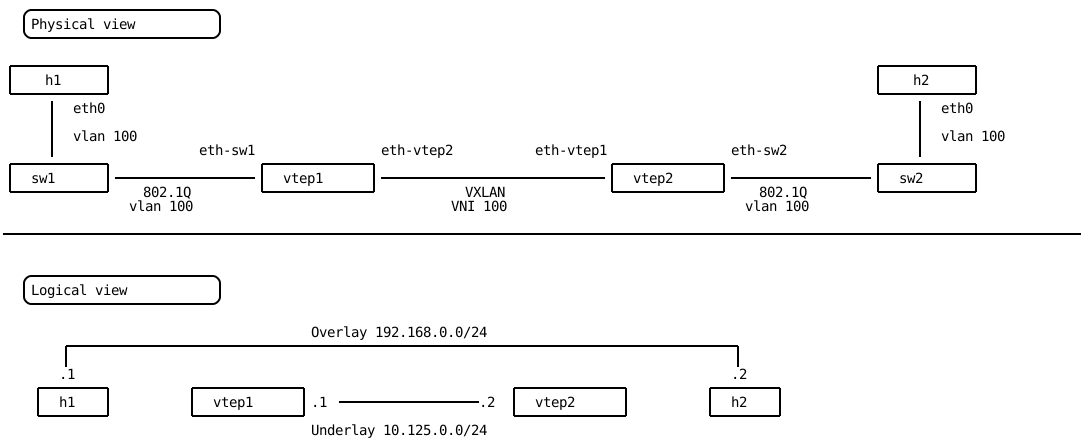
The VXLAN setup is the same as described in the VXLAN configuration chapter; refer to that section for additional details.
vtep1 running config# / vrf main
vtep1 running vrf main# / vrf main interface
vtep1 running interface# / vrf main interface physical eth-sw1
vtep1 running physical eth-sw1#! / vrf main interface physical eth-sw1 port pci-b0s4
vtep1 running physical eth-sw1# / vrf main interface physical eth-vtep2
vtep1 running physical eth-vtep2#! / vrf main interface physical eth-vtep2 ipv4
vtep1 running ipv4#! / vrf main interface physical eth-vtep2 ipv4 address 10.125.0.1/24
vtep1 running ipv4#! / vrf main interface physical eth-vtep2 port pci-b0s5
vtep1 running ipv4# / vrf main interface bridge br100
vtep1 running bridge br100# / vrf main interface bridge br100 link-interface eth-sw1.100
vtep1 running bridge br100# / vrf main interface bridge br100 link-interface vxlan100
vtep1 running bridge br100# / vrf main interface vlan eth-sw1.100
vtep1 running vlan eth-sw1.100#! / vrf main interface vlan eth-sw1.100 vlan-id 100
vtep1 running vlan eth-sw1.100#! / vrf main interface vlan eth-sw1.100 link-interface eth-sw1
vtep1 running vlan eth-sw1.100# / vrf main interface vxlan vxlan100
vtep1 running vxlan vxlan100#! / vrf main interface vxlan vxlan100 vni 100
vtep1 running vxlan vxlan100# / vrf main interface vxlan vxlan100 group 239.0.0.8
vtep1 running vxlan vxlan100#! / vrf main interface vxlan vxlan100 link-interface eth-vtep2
vtep2 running config# / vrf main
vtep2 running vrf main# / vrf main interface
vtep2 running interface# / vrf main interface physical eth-sw2
vtep2 running physical eth-sw2#! / vrf main interface physical eth-sw2 port pci-b0s4
vtep2 running physical eth-sw2# / vrf main interface physical eth-vtep1
vtep2 running physical eth-vtep1#! / vrf main interface physical eth-vtep1 ipv4
vtep2 running ipv4#! / vrf main interface physical eth-vtep1 ipv4 address 10.125.0.2/24
vtep2 running ipv4#! / vrf main interface physical eth-vtep1 port pci-b0s5
vtep2 running ipv4# / vrf main interface bridge br100
vtep2 running bridge br100# / vrf main interface bridge br100 link-interface eth-sw2.100
vtep2 running bridge br100# / vrf main interface bridge br100 link-interface vxlan100
vtep2 running bridge br100# / vrf main interface vlan eth-sw2.100
vtep2 running vlan eth-sw2.100#! / vrf main interface vlan eth-sw2.100 vlan-id 100
vtep2 running vlan eth-sw2.100#! / vrf main interface vlan eth-sw2.100 link-interface eth-sw2
vtep2 running vlan eth-sw2.100# / vrf main interface vxlan vxlan100
vtep2 running vxlan vxlan100#! / vrf main interface vxlan vxlan100 vni 100
vtep2 running vxlan vxlan100# / vrf main interface vxlan vxlan100 group 239.0.0.8
vtep2 running vxlan vxlan100#! / vrf main interface vxlan vxlan100 link-interface eth-vtep1
This configuration represents a pure VXLAN setup without a BGP EVPN control-plane. Traffic between hosts h1 and h2 is forwarded based on statically configured remote VTEPs. In contrast, a BGP EVPN control-plane distributes remote VTEP information via EVPN prefixes and advertises MAC address reachability behind VTEPs. As a result, local learning capabilities are not required.
vtep1 running config# / vrf main interface vxlan vxlan100 learning false
vtep1 running config# del / vrf main interface vxlan vxlan100 group
vtep2 running config# / vrf main interface vxlan vxlan100 learning false
vtep2 running config# del / vrf main interface vxlan vxlan100 group
The VXLAN FDB is now disabled, preventing traffic from traversing between VTEPs. As a result, the entries have been removed.
vtep1> show vxlan fdb
neighbor interface link-layer-address link-interface port vni state
======== ========= ================== ============== ==== === =====
BGP EVPN is configured under the l2vpn-evpn address-family. The
advertise-all-vni statement enables the advertisement of all configured
VXLAN identifiers (VNI).
vtep1 running config# / vrf main routing bgp as 65000
vtep1 running config# / vrf main routing bgp router-id 10.125.0.1
vtep1 running config# / vrf main routing bgp address-family l2vpn-evpn advertise-all-vni true
vtep2 running config# / vrf main routing bgp as 65000
vtep2 running config# / vrf main routing bgp router-id 10.125.0.2
vtep2 running config# / vrf main routing bgp address-family l2vpn-evpn advertise-all-vni true
The VNI ID 100 is now recognized by EVPN through the control-plane.
vtep1> show evpn vni all
VNI        Type VxLAN IF              # MACs   # ARPs   # Remote VTEPs  Tenant VRF
100        L2   vxlan100              0        0        0               default
A ping from host h1 is used to generate traffic and trigger the advertisement of an EVPN prefix for its MAC address. The ping is not yet successful.
root@h1:~# ping -c1 192.168.0.2
PING 192.168.0.2 (192.168.0.2) 56(84) bytes of data.
From 192.168.0.1 icmp_seq=1 Destination Host Unreachable

--- 192.168.0.2 ping statistics ---
1 packets transmitted, 0 received, +1 errors, 100% packet loss, time 0ms
The BGP table for the l2vpn evpn address-family on vtep1 includes two
entries:
[2]:[0]:[48]:[de:ed:01:d0:52:5f]corresponds to host h1 and its associated VTEP has the next-hop10.125.0.1.[3]:[0]:[32]:[10.125.0.1]means that the10.125.0.1VTEP desires to receive BUM frames.
vtep1> show bgp l2vpn evpn
BGP table version is 2, local router ID is 10.125.0.1
Status codes: s suppressed, d damped, h history, * valid, > best, i - internal
Origin codes: i - IGP, e - EGP, ? - incomplete
EVPN type-1 prefix: [1]:[EthTag]:[ESI]:[IPlen]:[VTEP-IP]:[Frag-id]
EVPN type-2 prefix: [2]:[EthTag]:[MAClen]:[MAC]:[IPlen]:[IP]
EVPN type-3 prefix: [3]:[EthTag]:[IPlen]:[OrigIP]
EVPN type-4 prefix: [4]:[ESI]:[IPlen]:[OrigIP]
EVPN type-5 prefix: [5]:[EthTag]:[IPlen]:[IP]

   Network          Next Hop            Metric LocPrf Weight Path
Route Distinguisher: 10.125.0.1:2
 *> [2]:[0]:[48]:[de:ed:01:d0:52:5f]
                    10.125.0.1                         32768 i
                    ET:8 RT:65000:100
 *> [3]:[0]:[32]:[10.125.0.1]
                    10.125.0.1                         32768 i
                    ET:8 RT:65000:100

Displayed 2 out of 2 total prefixes
Configuring the neighbor initiates EVPN prefixes exchange. Since
ipv4-unicast is enabled by default, it must be explicitly disabled.
vtep1 running config# / vrf main routing bgp neighbor 10.125.0.2 remote-as internal
vtep1 running config# / vrf main routing bgp neighbor 10.125.0.2 address-family ipv4-unicast enabled false
vtep1 running config# / vrf main routing bgp neighbor 10.125.0.2 address-family l2vpn-evpn
vtep2 running config# / vrf main routing bgp neighbor 10.125.0.1 remote-as internal
vtep2 running config# / vrf main routing bgp neighbor 10.125.0.1 address-family ipv4-unicast enabled false
vtep2 running config# / vrf main routing bgp neighbor 10.125.0.1 address-family l2vpn-evpn
h1 is now able to successfully ping h2.
root@h1:~# ping -c1 192.168.0.2
PING 192.168.0.2 (192.168.0.2) 56(84) bytes of data.
64 bytes from 192.168.0.2: icmp_seq=1 ttl=64 time=2048 ms

--- 192.168.0.2 ping statistics ---
1 packets transmitted, 1 received, 0% packet loss, time 0ms
rtt min/avg/max/mdev = 2048.161/2048.161/2048.161/0.000 ms
EVPN prefixes are successfully exchanged between VTEPs.
vtep1> show bgp l2vpn evpn
BGP table version is 2, local router ID is 10.125.0.1
Status codes: s suppressed, d damped, h history, * valid, > best, i - internal
Origin codes: i - IGP, e - EGP, ? - incomplete
EVPN type-1 prefix: [1]:[EthTag]:[ESI]:[IPlen]:[VTEP-IP]:[Frag-id]
EVPN type-2 prefix: [2]:[EthTag]:[MAClen]:[MAC]:[IPlen]:[IP]
EVPN type-3 prefix: [3]:[EthTag]:[IPlen]:[OrigIP]
EVPN type-4 prefix: [4]:[ESI]:[IPlen]:[OrigIP]
EVPN type-5 prefix: [5]:[EthTag]:[IPlen]:[IP]

   Network          Next Hop            Metric LocPrf Weight Path
Route Distinguisher: 10.125.0.1:2
 *> [2]:[0]:[48]:[de:ed:01:d0:52:5f]
                    10.125.0.1                         32768 i
                    ET:8 RT:65000:100
 *> [3]:[0]:[32]:[10.125.0.1]
                    10.125.0.1                         32768 i
                    ET:8 RT:65000:100
Route Distinguisher: 10.125.0.2:2
 *>i[2]:[0]:[48]:[de:ed:01:dc:0e:62]
                    10.125.0.2                    100      0 i
                    RT:65000:100 ET:8
 *>i[3]:[0]:[32]:[10.125.0.2]
                    10.125.0.2                    100      0 i
                    RT:65000:100 ET:8

Displayed 4 out of 4 total prefixes
After resetting ARP on h1 and h2, a ping from h1 to h2 shows that ARP packets are still being broadcasted through the VXLAN tunnel, as observed in the capture on vtep1’s eth-vtep2 interface.
vtep1> cmd traffic-capture eth-vtep2 filter udp count 2
tcpdump: verbose output suppressed, use -v[v]... for full protocol decode
listening on eth-vtep2, link-type EN10MB (Ethernet), snapshot length 262144 bytes
09:14:07.523491 de:ed:02:fa:d9:f9 > de:ed:02:92:50:81, ethertype IPv4 (0x0800), length 92: 10.125.0.1.65046 > 10.125.0.2.4789: VXLAN, flags [I] (0x08), vni 100
de:ed:01:d0:52:5f > ff:ff:ff:ff:ff:ff, ethertype ARP (0x0806), length 42: Request who-has 192.168.0.2 tell 192.168.0.1, length 28
09:14:07.524284 de:ed:02:92:50:81 > de:ed:02:fa:d9:f9, ethertype IPv4 (0x0800), length 92: 10.125.0.2.62884 > 10.125.0.1.4789: VXLAN, flags [I] (0x08), vni 100
de:ed:01:dc:0e:62 > de:ed:01:d0:52:5f, ethertype ARP (0x0806), length 42: Reply 192.168.0.2 is-at de:ed:01:dc:0e:62, length 28
2 packets captured
2 packets received by filter
0 packets dropped by kernel
BUM traffic can be explicitly blocked from being transmitted over the VXLAN tunnel.
vtep1 running config# / vrf main routing bgp address-family l2vpn-evpn flooding disabled
vtep2 running config# / vrf main routing bgp address-family l2vpn-evpn flooding disabled
The BGP table does not contain type-3 EVPN prefixes anymore.
vtep1> show bgp l2vpn evpn
BGP table version is 3, local router ID is 10.125.0.1
Status codes: s suppressed, d damped, h history, * valid, > best, i - internal
Origin codes: i - IGP, e - EGP, ? - incomplete
EVPN type-1 prefix: [1]:[EthTag]:[ESI]:[IPlen]:[VTEP-IP]:[Frag-id]
EVPN type-2 prefix: [2]:[EthTag]:[MAClen]:[MAC]:[IPlen]:[IP]
EVPN type-3 prefix: [3]:[EthTag]:[IPlen]:[OrigIP]
EVPN type-4 prefix: [4]:[ESI]:[IPlen]:[OrigIP]
EVPN type-5 prefix: [5]:[EthTag]:[IPlen]:[IP]

   Network          Next Hop            Metric LocPrf Weight Path
Route Distinguisher: 10.125.0.1:2
 *> [2]:[0]:[48]:[de:ed:01:d0:52:5f]
                    10.125.0.1                         32768 i
                    ET:8 RT:65000:100
Route Distinguisher: 10.125.0.2:2
 *>i[2]:[0]:[48]:[de:ed:01:dc:0e:62]
                    10.125.0.2                    100      0 i
                    RT:65000:100 ET:8

Displayed 2 out of 2 total prefixes
BUM flooding is disabled, as confirmed by flushing the neighbor entries on h1 and h2, after which h1 is no longer able to ping h2.
root@h1:~# ping -c1 192.168.0.2
PING 192.168.0.2 (192.168.0.2) 56(84) bytes of data.
From 192.168.0.1 icmp_seq=1 Destination Host Unreachable

--- 192.168.0.2 ping statistics ---
1 packets transmitted, 0 received, +1 errors, 100% packet loss, time 0ms
EVPN enables a VTEP to proxy neighbor discovery requests (ARP and NDP) on behalf of hosts located behind remote VTEPs. This functionality relies on EVPN route type 2 prefixes, which can also advertise MAC and IP address mappings.
To enable this behavior, an IP address must be configured on the bridge interface (also known as the SVI), which acts as the default gateway for the connected hosts. This configuration allows the VTEP to learn the ARP resolution for locally connected hosts.
vtep1 running config# / vrf main interface bridge br100 ipv4 address 192.168.0.254/24
vtep2 running config# / vrf main interface bridge br100 ipv4 address 192.168.0.254/24
A ping to 192.168.0.254 from h1 or h2 triggers an ARP resolution on the local VTEP, which in turn causes the advertisement of the corresponding neighbor entry via EVPN.
root@h1:~# ping -c1 192.168.0.254
PING 192.168.0.254 (192.168.0.254) 56(84) bytes of data.
64 bytes from 192.168.0.254: icmp_seq=1 ttl=64 time=0.666 ms

--- 192.168.0.254 ping statistics ---
1 packets transmitted, 1 received, 0% packet loss, time 0ms
rtt min/avg/max/mdev = 0.666/0.666/0.666/0.000 ms
root@h2:~# ping -c1 192.168.0.254
PING 192.168.0.254 (192.168.0.254) 56(84) bytes of data.
64 bytes from 192.168.0.254: icmp_seq=1 ttl=64 time=0.659 ms

--- 192.168.0.254 ping statistics ---
1 packets transmitted, 1 received, 0% packet loss, time 0ms
rtt min/avg/max/mdev = 0.659/0.659/0.659/0.000 ms
vtep1> show bgp l2vpn evpn
BGP table version is 4, local router ID is 10.125.0.1
Status codes: s suppressed, d damped, h history, * valid, > best, i - internal
Origin codes: i - IGP, e - EGP, ? - incomplete
EVPN type-1 prefix: [1]:[EthTag]:[ESI]:[IPlen]:[VTEP-IP]:[Frag-id]
EVPN type-2 prefix: [2]:[EthTag]:[MAClen]:[MAC]:[IPlen]:[IP]
EVPN type-3 prefix: [3]:[EthTag]:[IPlen]:[OrigIP]
EVPN type-4 prefix: [4]:[ESI]:[IPlen]:[OrigIP]
EVPN type-5 prefix: [5]:[EthTag]:[IPlen]:[IP]

   Network          Next Hop            Metric LocPrf Weight Path
Route Distinguisher: 10.125.0.1:2
 *> [2]:[0]:[48]:[de:ed:01:d0:52:5f]
                    10.125.0.1                         32768 i
                    ET:8 RT:65000:100
 *> [2]:[0]:[48]:[de:ed:01:d0:52:5f]:[32]:[192.168.0.1]
                    10.125.0.1                         32768 i
                    ET:8 RT:65000:100
Route Distinguisher: 10.125.0.2:2
 *>i[2]:[0]:[48]:[de:ed:01:dc:0e:62]
                    10.125.0.2                    100      0 i
                    RT:65000:100 ET:8
 *>i[2]:[0]:[48]:[de:ed:01:dc:0e:62]:[32]:[192.168.0.2]
                    10.125.0.2                    100      0 i
                    RT:65000:100 ET:8

Displayed 4 out of 4 total prefixes
h1 is still not able able to ping h2.
root@h1:~# ping -c1 192.168.0.2
PING 192.168.0.2 (192.168.0.2) 56(84) bytes of data.
From 192.168.0.1 icmp_seq=1 Destination Host Unreachable

--- 192.168.0.2 ping statistics ---
1 packets transmitted, 0 received, +1 errors, 100% packet loss, time 0ms
When the neigh-suppress option is
enabled on the VXLAN interface, the VTEP will advertise the learned
MAC-to-IP mappings via EVPN, allowing remote VTEPs to respond to
neighbor discovery requests without flooding the network.
vtep1 running config# / vrf main interface bridge br100 link-interface vxlan100 neighbor-suppress true
vtep2 running config# / vrf main interface bridge br100 link-interface vxlan100 neighbor-suppress true
Host h1 is now able to successfully ping h2.
root@h1:~# ping -c1 192.168.0.2
PING 192.168.0.2 (192.168.0.2) 56(84) bytes of data.
64 bytes from 192.168.0.2: icmp_seq=1 ttl=64 time=1.45 ms

--- 192.168.0.2 ping statistics ---
1 packets transmitted, 1 received, 0% packet loss, time 0ms
rtt min/avg/max/mdev = 1.451/1.451/1.451/0.000 ms
The setup is operational, but configuring an SVI on the VTEPs as the gateway for the hosts has broken the isolation between the overlay and underlay networks. The routing table now shows that the underlay subnet 10.125.0.0/24 is reachable from the host subnet 192.168.0.0/24.
vtep1> show ipv4-routes
Codes: K - kernel route, C - connected, S - static, R - RIP,
       O - OSPF, I - IS-IS, B - BGP, N - NHRP, T - Table
       > - selected route, * - FIB route, r - rejected, b - backup

L3VRF default:
C>* 10.125.0.0/24 is directly connected, eth-vtep2, 00:00:35
C>* 192.168.0.0/24 is directly connected, br100, 00:00:09

2 routes displayed.
The bridge interface br100, which holds an IP address in the host subnet, is moved into an L3VRF. This isolates the overlay (unencapsulated) traffic from the underlay (VXLAN-encapsulated) traffic.
vtep1 running config# del / vrf main interface bridge br100
vtep1 running config# / vrf main l3vrf overlay table-id 1000
vtep1 running config# / vrf main l3vrf overlay interface bridge br100 ipv4 address 192.168.0.254/24
vtep1 running config# / vrf main l3vrf overlay interface bridge br100 link-interface eth-sw1.100
vtep1 running config# / vrf main l3vrf overlay interface bridge br100 link-interface vxlan100 neighbor-suppress true
vtep2 running config# del / vrf main interface bridge br100
vtep2 running config# / vrf main l3vrf overlay table-id 1000
vtep2 running config# / vrf main l3vrf overlay interface bridge br100 ipv4 address 192.168.0.254/24
vtep2 running config# / vrf main l3vrf overlay interface bridge br100 link-interface eth-sw2.100
vtep2 running config# / vrf main l3vrf overlay interface bridge br100 link-interface vxlan100 neighbor-suppress true
Note
eth-h1, eth-h2, and vxlan100 are members of the br100 bridge, which resides in
the overlay L3VRF. They inherit the L3VRF assignment from their parent interface
and must not be configured directly within the L3VRF context.
vtep1> show ipv4-routes
Codes: K - kernel route, C - connected, S - static, R - RIP,
       O - OSPF, I - IS-IS, B - BGP, N - NHRP, T - Table
       > - selected route, * - FIB route, r - rejected, b - backup

L3VRF default:
C>* 10.125.0.0/24 is directly connected, eth-vtep2, 00:00:39

1 routes displayed.
vtep1> show ipv4-routes l3vrf overlay
Codes: K - kernel route, C - connected, S - static, R - RIP,
       O - OSPF, I - IS-IS, B - BGP, N - NHRP, T - Table
       > - selected route, * - FIB route, r - rejected, b - backup

L3VRF overlay:
K>* 0.0.0.0/0 [255/8192] unreachable (ICMP unreachable), 00:00:03
C>* 192.168.0.0/24 is directly connected, br100, 00:00:02

2 routes displayed.
The following configuration examples show the complete configuration used throughout this section:
vtep1> show config fullpath nodefault / vrf main
/ vrf main l3vrf overlay table-id 1000
/ vrf main l3vrf overlay interface bridge br100 ipv4 address 192.168.0.254/24
/ vrf main l3vrf overlay interface bridge br100 link-interface eth-sw1.100
/ vrf main l3vrf overlay interface bridge br100 link-interface vxlan100 neighbor-suppress true
/ vrf main interface physical eth-sw1 port pci-b0s4
/ vrf main interface physical eth-vtep2 ipv4 address 10.125.0.1/24
/ vrf main interface physical eth-vtep2 port pci-b0s5
/ vrf main interface vlan eth-sw1.100 vlan-id 100
/ vrf main interface vlan eth-sw1.100 link-interface eth-sw1
/ vrf main interface vxlan vxlan100 vni 100
/ vrf main interface vxlan vxlan100 link-interface eth-vtep2
/ vrf main interface vxlan vxlan100 learning false
/ vrf main routing bgp as 65000
/ vrf main routing bgp router-id 10.125.0.1
/ vrf main routing bgp address-family l2vpn-evpn flooding disabled
/ vrf main routing bgp address-family l2vpn-evpn advertise-all-vni true
/ vrf main routing bgp neighbor 10.125.0.2 remote-as internal
/ vrf main routing bgp neighbor 10.125.0.2 address-family ipv4-unicast enabled false
/ vrf main routing bgp neighbor 10.125.0.2 address-family l2vpn-evpn
vtep2> show config fullpath nodefault / vrf main
/ vrf main l3vrf overlay table-id 1000
/ vrf main l3vrf overlay interface bridge br100 ipv4 address 192.168.0.254/24
/ vrf main l3vrf overlay interface bridge br100 link-interface eth-sw2.100
/ vrf main l3vrf overlay interface bridge br100 link-interface vxlan100 neighbor-suppress true
/ vrf main interface physical eth-sw2 port pci-b0s4
/ vrf main interface physical eth-vtep1 ipv4 address 10.125.0.2/24
/ vrf main interface physical eth-vtep1 port pci-b0s5
/ vrf main interface vlan eth-sw2.100 vlan-id 100
/ vrf main interface vlan eth-sw2.100 link-interface eth-sw2
/ vrf main interface vxlan vxlan100 vni 100
/ vrf main interface vxlan vxlan100 link-interface eth-vtep1
/ vrf main interface vxlan vxlan100 learning false
/ vrf main routing bgp as 65000
/ vrf main routing bgp router-id 10.125.0.2
/ vrf main routing bgp address-family l2vpn-evpn flooding disabled
/ vrf main routing bgp address-family l2vpn-evpn advertise-all-vni true
/ vrf main routing bgp neighbor 10.125.0.1 remote-as internal
/ vrf main routing bgp neighbor 10.125.0.1 address-family ipv4-unicast enabled false
/ vrf main routing bgp neighbor 10.125.0.1 address-family l2vpn-evpn
Configuring an integrated routing and bridging EVPN network
Hosts h3 and h4 are added to the existing topology and connected to a second overlay subnet, 192.168.1.0/24, associated with VNI 101. This section covers the configuration required to enable routing between the two overlay networks.
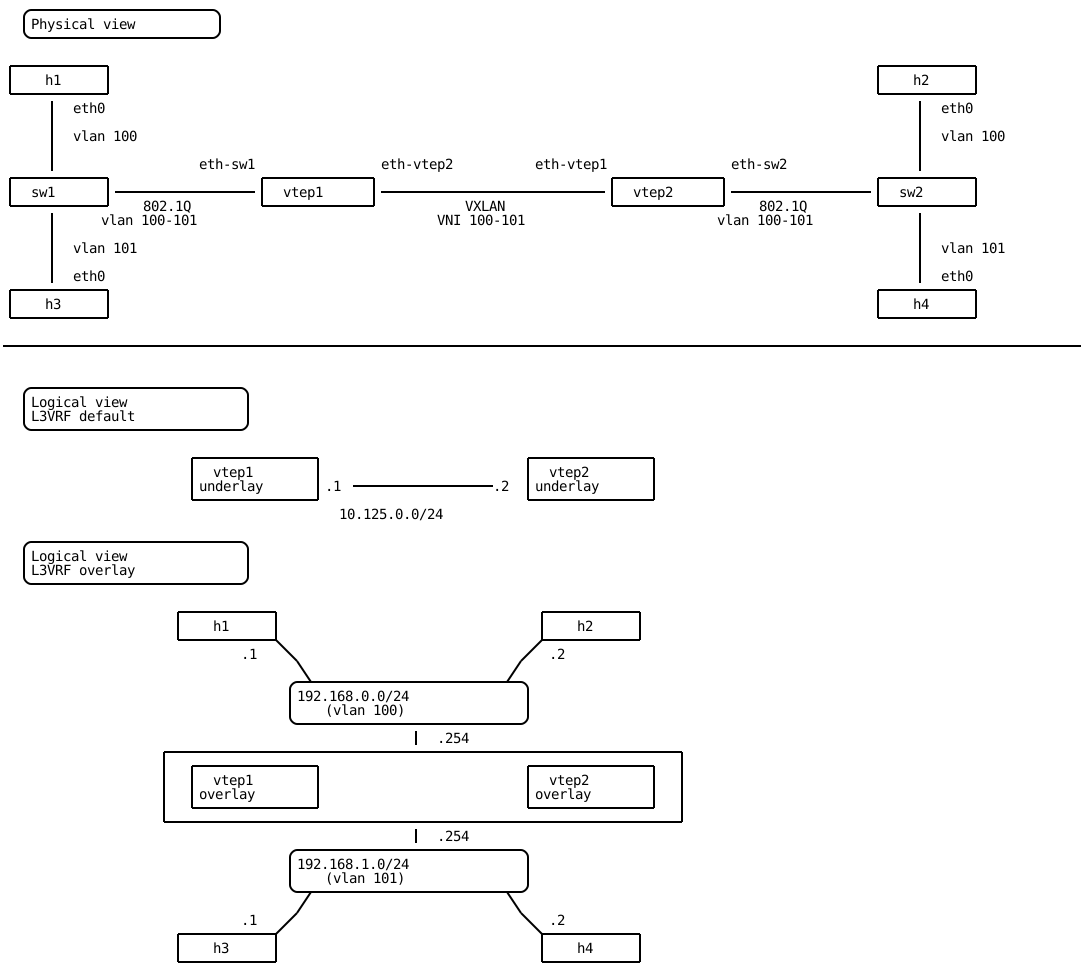
This allows hosts in VNI 100 to communicate with hosts in VNI 101, and vice versa. Two routing modes can be used to achieve this:
Asymmetric mode: Outbound and return traffic may traverse different VNIs. The destination VNI is used to forward traffic across the VXLAN fabric. For example, if host h1 (192.168.0.1) pings host h4 (192.168.1.2), the ICMP request is received by the SVI in VNI 100, routed to the local SVI in VNI 101, and then forwarded to vtep2 over the VXLAN tunnel using VNI 101. The return ICMP reply from h4 is forwarded back to vtep1 using VNI 100.
Symmetric mode: A dedicated Layer 3 VNI (e.g., vni 300) is introduced for inter-subnet routing. Both directions of routed traffic (requests and replies) use this L3 VNI. For instance, the same ICMP request and reply between h1 and h4 are encapsulated using VNI 300. Traffic destined for devices within the same subnet remains in their respective L2 VNI.
See also
Both EVPN integrated routing and bridging modes are standardized by RFC 9135.
Asymmetric mode
VTEP vtep1 and vtep2 are connected to hosts h3 and h4, respectively, and are
configured for VNI 101. The default gateway for this subnet is 192.168.1.254.
The configuration closely mirrors that of the previous section, where hosts h1
and h2 were connected to the VTEPs using VNI 100.
vtep1 running config# / vrf main interface vxlan vxlan101 vni 101
vtep1 running config# / vrf main interface vxlan vxlan101 link-interface eth-vtep2
vtep1 running config# / vrf main interface vxlan vxlan101 learning false
vtep1 running config# / vrf main interface vlan eth-sw1.101 vlan-id 101
vtep1 running config#! / vrf main interface vlan eth-sw1.101 link-interface eth-sw1
vtep1 running config# / vrf main l3vrf overlay interface bridge br101 ipv4 address 192.168.1.254/24
vtep1 running config# / vrf main l3vrf overlay interface bridge br101 link-interface eth-sw1.101
vtep1 running config# / vrf main l3vrf overlay interface bridge br101 link-interface vxlan101
vtep1 running config# / vrf main l3vrf overlay interface bridge br101 link-interface vxlan101 neighbor-suppress true
vtep2 running config# / vrf main interface vxlan vxlan101 vni 101
vtep2 running config# / vrf main interface vxlan vxlan101 link-interface eth-vtep1
vtep2 running config# / vrf main interface vxlan vxlan101 learning false
vtep2 running config# / vrf main interface vlan eth-sw2.101 vlan-id 101
vtep2 running config#! / vrf main interface vlan eth-sw2.101 link-interface eth-sw2
vtep2 running config# / vrf main l3vrf overlay interface bridge br101 ipv4 address 192.168.1.254/24
vtep2 running config# / vrf main l3vrf overlay interface bridge br101 link-interface eth-sw2.101
vtep2 running config# / vrf main l3vrf overlay interface bridge br101 link-interface vxlan101
vtep2 running config# / vrf main l3vrf overlay interface bridge br101 link-interface vxlan101 neighbor-suppress true
Hosts h1 and h3 are now able to ping h2 and h4, respectively. When a VTEP is configured with multiple SVI interfaces associated with different VNIs, it automatically enables inter-subnet routing in asymmetric mode.
root@h1:~# ping -c1 192.168.1.2
PING 192.168.1.2 (192.168.1.2) 56(84) bytes of data.
64 bytes from 192.168.1.2: icmp_seq=1 ttl=63 time=1.20 ms

--- 192.168.1.2 ping statistics ---
1 packets transmitted, 1 received, 0% packet loss, time 0ms
rtt min/avg/max/mdev = 1.200/1.200/1.200/0.000 ms
root@h3:~# ping -c1 192.168.0.2
PING 192.168.0.2 (192.168.0.2) 56(84) bytes of data.
64 bytes from 192.168.0.2: icmp_seq=1 ttl=63 time=1.19 ms

--- 192.168.0.2 ping statistics ---
1 packets transmitted, 1 received, 0% packet loss, time 0ms
rtt min/avg/max/mdev = 1.188/1.188/1.188/0.000 ms
Two entries per host are present in the EVPN BGP table.
vtep1> show bgp l2vpn evpn
BGP table version is 8, local router ID is 10.125.0.1
Status codes: s suppressed, d damped, h history, * valid, > best, i - internal
Origin codes: i - IGP, e - EGP, ? - incomplete
EVPN type-1 prefix: [1]:[EthTag]:[ESI]:[IPlen]:[VTEP-IP]:[Frag-id]
EVPN type-2 prefix: [2]:[EthTag]:[MAClen]:[MAC]:[IPlen]:[IP]
EVPN type-3 prefix: [3]:[EthTag]:[IPlen]:[OrigIP]
EVPN type-4 prefix: [4]:[ESI]:[IPlen]:[OrigIP]
EVPN type-5 prefix: [5]:[EthTag]:[IPlen]:[IP]

   Network          Next Hop            Metric LocPrf Weight Path
Route Distinguisher: 10.125.0.1:2
 *> [2]:[0]:[48]:[de:ed:01:d0:52:5f]
                    10.125.0.1                         32768 i
                    ET:8 RT:65000:100
 *> [2]:[0]:[48]:[de:ed:01:d0:52:5f]:[32]:[192.168.0.1]
                    10.125.0.1                         32768 i
                    ET:8 RT:65000:100
Route Distinguisher: 10.125.0.1:3
 *> [2]:[0]:[48]:[de:ed:01:d1:53:51]
                    10.125.0.1                         32768 i
                    ET:8 RT:65000:101
 *> [2]:[0]:[48]:[de:ed:01:d1:53:51]:[32]:[192.168.1.1]
                    10.125.0.1                         32768 i
                    ET:8 RT:65000:101
Route Distinguisher: 10.125.0.2:2
 *>i[2]:[0]:[48]:[de:ed:01:dc:0e:62]
                    10.125.0.2                    100      0 i
                    RT:65000:100 ET:8
 *>i[2]:[0]:[48]:[de:ed:01:dc:0e:62]:[32]:[192.168.0.2]
                    10.125.0.2                    100      0 i
                    RT:65000:100 ET:8
Route Distinguisher: 10.125.0.2:3
 *>i[2]:[0]:[48]:[de:ed:01:df:ce:6f]
                    10.125.0.2                    100      0 i
                    RT:65000:101 ET:8
 *>i[2]:[0]:[48]:[de:ed:01:df:ce:6f]:[32]:[192.168.1.2]
                    10.125.0.2                    100      0 i
                    RT:65000:101 ET:8

Displayed 8 out of 8 total prefixes
The following configuration examples show the complete configuration used throughout this section:
vtep1> show config fullpath nodefault / vrf main
/ vrf main l3vrf overlay table-id 1000
/ vrf main l3vrf overlay interface bridge br100 ipv4 address 192.168.0.254/24
/ vrf main l3vrf overlay interface bridge br100 link-interface eth-sw1.100
/ vrf main l3vrf overlay interface bridge br100 link-interface vxlan100 neighbor-suppress true
/ vrf main l3vrf overlay interface bridge br101 ipv4 address 192.168.1.254/24
/ vrf main l3vrf overlay interface bridge br101 link-interface eth-sw1.101
/ vrf main l3vrf overlay interface bridge br101 link-interface vxlan101 neighbor-suppress true
/ vrf main interface physical eth-sw1 port pci-b0s4
/ vrf main interface physical eth-vtep2 ipv4 address 10.125.0.1/24
/ vrf main interface physical eth-vtep2 port pci-b0s5
/ vrf main interface vlan eth-sw1.100 vlan-id 100
/ vrf main interface vlan eth-sw1.100 link-interface eth-sw1
/ vrf main interface vlan eth-sw1.101 vlan-id 101
/ vrf main interface vlan eth-sw1.101 link-interface eth-sw1
/ vrf main interface vxlan vxlan100 vni 100
/ vrf main interface vxlan vxlan100 link-interface eth-vtep2
/ vrf main interface vxlan vxlan100 learning false
/ vrf main interface vxlan vxlan101 vni 101
/ vrf main interface vxlan vxlan101 link-interface eth-vtep2
/ vrf main interface vxlan vxlan101 learning false
/ vrf main routing bgp as 65000
/ vrf main routing bgp router-id 10.125.0.1
/ vrf main routing bgp address-family l2vpn-evpn flooding disabled
/ vrf main routing bgp address-family l2vpn-evpn advertise-all-vni true
/ vrf main routing bgp neighbor 10.125.0.2 remote-as internal
/ vrf main routing bgp neighbor 10.125.0.2 address-family ipv4-unicast enabled false
/ vrf main routing bgp neighbor 10.125.0.2 address-family l2vpn-evpn
vtep2> show config fullpath nodefault / vrf main
/ vrf main l3vrf overlay table-id 1000
/ vrf main l3vrf overlay interface bridge br100 ipv4 address 192.168.0.254/24
/ vrf main l3vrf overlay interface bridge br100 link-interface eth-sw2.100
/ vrf main l3vrf overlay interface bridge br100 link-interface vxlan100 neighbor-suppress true
/ vrf main l3vrf overlay interface bridge br101 ipv4 address 192.168.1.254/24
/ vrf main l3vrf overlay interface bridge br101 link-interface eth-sw2.101
/ vrf main l3vrf overlay interface bridge br101 link-interface vxlan101 neighbor-suppress true
/ vrf main interface physical eth-sw2 port pci-b0s4
/ vrf main interface physical eth-vtep1 ipv4 address 10.125.0.2/24
/ vrf main interface physical eth-vtep1 port pci-b0s5
/ vrf main interface vlan eth-sw2.100 vlan-id 100
/ vrf main interface vlan eth-sw2.100 link-interface eth-sw2
/ vrf main interface vlan eth-sw2.101 vlan-id 101
/ vrf main interface vlan eth-sw2.101 link-interface eth-sw2
/ vrf main interface vxlan vxlan100 vni 100
/ vrf main interface vxlan vxlan100 link-interface eth-vtep1
/ vrf main interface vxlan vxlan100 learning false
/ vrf main interface vxlan vxlan101 vni 101
/ vrf main interface vxlan vxlan101 link-interface eth-vtep1
/ vrf main interface vxlan vxlan101 learning false
/ vrf main routing bgp as 65000
/ vrf main routing bgp router-id 10.125.0.2
/ vrf main routing bgp address-family l2vpn-evpn flooding disabled
/ vrf main routing bgp address-family l2vpn-evpn advertise-all-vni true
/ vrf main routing bgp neighbor 10.125.0.1 remote-as internal
/ vrf main routing bgp neighbor 10.125.0.1 address-family ipv4-unicast enabled false
/ vrf main routing bgp neighbor 10.125.0.1 address-family l2vpn-evpn
Symmetric mode
The symmetric mode requires configuring an Layer-3 VNI on both VTEPs.
vtep1 running config# / vrf main l3vrf overlay routing bgp l3vni 300
vtep1 running config#! / vrf main interface vxlan vxlan300 vni 300
vtep1 running config# / vrf main interface vxlan vxlan300 link-interface eth-vtep2
vtep1 running config# / vrf main l3vrf overlay interface bridge br300 link-interface vxlan300
vtep2 running config# / vrf main l3vrf overlay routing bgp l3vni 300
vtep2 running config#! / vrf main interface vxlan vxlan300 vni 300
vtep2 running config# / vrf main interface vxlan vxlan300 link-interface eth-vtep1
vtep2 running config# / vrf main l3vrf overlay interface bridge br300 link-interface vxlan300
Hosts h1 and h3 are able to ping h2 and h4, respectively.
root@h1:~# ping -c1 192.168.1.2
PING 192.168.1.2 (192.168.1.2) 56(84) bytes of data.
64 bytes from 192.168.1.2: icmp_seq=1 ttl=62 time=1.14 ms

--- 192.168.1.2 ping statistics ---
1 packets transmitted, 1 received, 0% packet loss, time 0ms
rtt min/avg/max/mdev = 1.140/1.140/1.140/0.000 ms
root@h3:~# ping -c1 192.168.0.2
PING 192.168.0.2 (192.168.0.2) 56(84) bytes of data.
64 bytes from 192.168.0.2: icmp_seq=1 ttl=62 time=1.29 ms

--- 192.168.0.2 ping statistics ---
1 packets transmitted, 1 received, 0% packet loss, time 0ms
rtt min/avg/max/mdev = 1.287/1.287/1.287/0.000 ms
vtep1> show bgp l2vpn evpn
BGP table version is 10, local router ID is 10.125.0.1
Status codes: s suppressed, d damped, h history, * valid, > best, i - internal
Origin codes: i - IGP, e - EGP, ? - incomplete
EVPN type-1 prefix: [1]:[EthTag]:[ESI]:[IPlen]:[VTEP-IP]:[Frag-id]
EVPN type-2 prefix: [2]:[EthTag]:[MAClen]:[MAC]:[IPlen]:[IP]
EVPN type-3 prefix: [3]:[EthTag]:[IPlen]:[OrigIP]
EVPN type-4 prefix: [4]:[ESI]:[IPlen]:[OrigIP]
EVPN type-5 prefix: [5]:[EthTag]:[IPlen]:[IP]

   Network          Next Hop            Metric LocPrf Weight Path
Route Distinguisher: 10.125.0.1:2
 *> [2]:[0]:[48]:[de:ed:01:d0:52:5f]
                    10.125.0.1                         32768 i
                    ET:8 RT:65000:100
 *> [2]:[0]:[48]:[de:ed:01:d0:52:5f]:[32]:[192.168.0.1]
                    10.125.0.1                         32768 i
                    ET:8 RT:65000:100 RT:65000:300 Rmac:82:cc:f3:0d:32:d9
Route Distinguisher: 10.125.0.1:3
 *> [2]:[0]:[48]:[de:ed:01:d1:53:51]
                    10.125.0.1                         32768 i
                    ET:8 RT:65000:101
 *> [2]:[0]:[48]:[de:ed:01:d1:53:51]:[32]:[192.168.1.1]
                    10.125.0.1                         32768 i
                    ET:8 RT:65000:101 RT:65000:300 Rmac:82:cc:f3:0d:32:d9
Route Distinguisher: 10.125.0.2:2
 *>i[2]:[0]:[48]:[de:ed:01:dc:0e:62]
                    10.125.0.2                    100      0 i
                    RT:65000:100 ET:8
 *>i[2]:[0]:[48]:[de:ed:01:dc:0e:62]:[32]:[192.168.0.2]
                    10.125.0.2                    100      0 i
                    RT:65000:100 RT:65000:300 ET:8 Rmac:6a:0e:5b:06:2b:bd
Route Distinguisher: 10.125.0.2:3
 *>i[2]:[0]:[48]:[de:ed:01:df:ce:6f]
                    10.125.0.2                    100      0 i
                    RT:65000:101 ET:8
 *>i[2]:[0]:[48]:[de:ed:01:df:ce:6f]:[32]:[192.168.1.2]
                    10.125.0.2                    100      0 i
                    RT:65000:101 RT:65000:300 ET:8 Rmac:6a:0e:5b:06:2b:bd

Displayed 8 out of 8 total prefixes
The following configuration examples show the complete configuration used throughout this section:
vtep1> show config fullpath nodefault / vrf main
/ vrf main l3vrf overlay table-id 1000
/ vrf main l3vrf overlay interface bridge br100 ipv4 address 192.168.0.254/24
/ vrf main l3vrf overlay interface bridge br100 link-interface eth-sw1.100
/ vrf main l3vrf overlay interface bridge br100 link-interface vxlan100 neighbor-suppress true
/ vrf main l3vrf overlay interface bridge br101 ipv4 address 192.168.1.254/24
/ vrf main l3vrf overlay interface bridge br101 link-interface eth-sw1.101
/ vrf main l3vrf overlay interface bridge br101 link-interface vxlan101 neighbor-suppress true
/ vrf main l3vrf overlay interface bridge br300 link-interface vxlan300
/ vrf main l3vrf overlay routing bgp l3vni 300
/ vrf main interface physical eth-sw1 port pci-b0s4
/ vrf main interface physical eth-vtep2 ipv4 address 10.125.0.1/24
/ vrf main interface physical eth-vtep2 port pci-b0s5
/ vrf main interface vlan eth-sw1.100 vlan-id 100
/ vrf main interface vlan eth-sw1.100 link-interface eth-sw1
/ vrf main interface vlan eth-sw1.101 vlan-id 101
/ vrf main interface vlan eth-sw1.101 link-interface eth-sw1
/ vrf main interface vxlan vxlan100 vni 100
/ vrf main interface vxlan vxlan100 link-interface eth-vtep2
/ vrf main interface vxlan vxlan100 learning false
/ vrf main interface vxlan vxlan101 vni 101
/ vrf main interface vxlan vxlan101 link-interface eth-vtep2
/ vrf main interface vxlan vxlan101 learning false
/ vrf main interface vxlan vxlan300 vni 300
/ vrf main interface vxlan vxlan300 link-interface eth-vtep2
/ vrf main routing bgp as 65000
/ vrf main routing bgp router-id 10.125.0.1
/ vrf main routing bgp address-family l2vpn-evpn flooding disabled
/ vrf main routing bgp address-family l2vpn-evpn advertise-all-vni true
/ vrf main routing bgp neighbor 10.125.0.2 remote-as internal
/ vrf main routing bgp neighbor 10.125.0.2 address-family ipv4-unicast enabled false
/ vrf main routing bgp neighbor 10.125.0.2 address-family l2vpn-evpn
vtep2> show config fullpath nodefault / vrf main
/ vrf main l3vrf overlay table-id 1000
/ vrf main l3vrf overlay interface bridge br100 ipv4 address 192.168.0.254/24
/ vrf main l3vrf overlay interface bridge br100 link-interface eth-sw2.100
/ vrf main l3vrf overlay interface bridge br100 link-interface vxlan100 neighbor-suppress true
/ vrf main l3vrf overlay interface bridge br101 ipv4 address 192.168.1.254/24
/ vrf main l3vrf overlay interface bridge br101 link-interface eth-sw2.101
/ vrf main l3vrf overlay interface bridge br101 link-interface vxlan101 neighbor-suppress true
/ vrf main l3vrf overlay interface bridge br300 link-interface vxlan300
/ vrf main l3vrf overlay routing bgp l3vni 300
/ vrf main interface physical eth-sw2 port pci-b0s4
/ vrf main interface physical eth-vtep1 ipv4 address 10.125.0.2/24
/ vrf main interface physical eth-vtep1 port pci-b0s5
/ vrf main interface vlan eth-sw2.100 vlan-id 100
/ vrf main interface vlan eth-sw2.100 link-interface eth-sw2
/ vrf main interface vlan eth-sw2.101 vlan-id 101
/ vrf main interface vlan eth-sw2.101 link-interface eth-sw2
/ vrf main interface vxlan vxlan100 vni 100
/ vrf main interface vxlan vxlan100 link-interface eth-vtep1
/ vrf main interface vxlan vxlan100 learning false
/ vrf main interface vxlan vxlan101 vni 101
/ vrf main interface vxlan vxlan101 link-interface eth-vtep1
/ vrf main interface vxlan vxlan101 learning false
/ vrf main interface vxlan vxlan300 vni 300
/ vrf main interface vxlan vxlan300 link-interface eth-vtep1
/ vrf main routing bgp as 65000
/ vrf main routing bgp router-id 10.125.0.2
/ vrf main routing bgp address-family l2vpn-evpn flooding disabled
/ vrf main routing bgp address-family l2vpn-evpn advertise-all-vni true
/ vrf main routing bgp neighbor 10.125.0.1 remote-as internal
/ vrf main routing bgp neighbor 10.125.0.1 address-family ipv4-unicast enabled false
/ vrf main routing bgp neighbor 10.125.0.1 address-family l2vpn-evpn
Configuring the redistribution of IP prefixes to EVPN
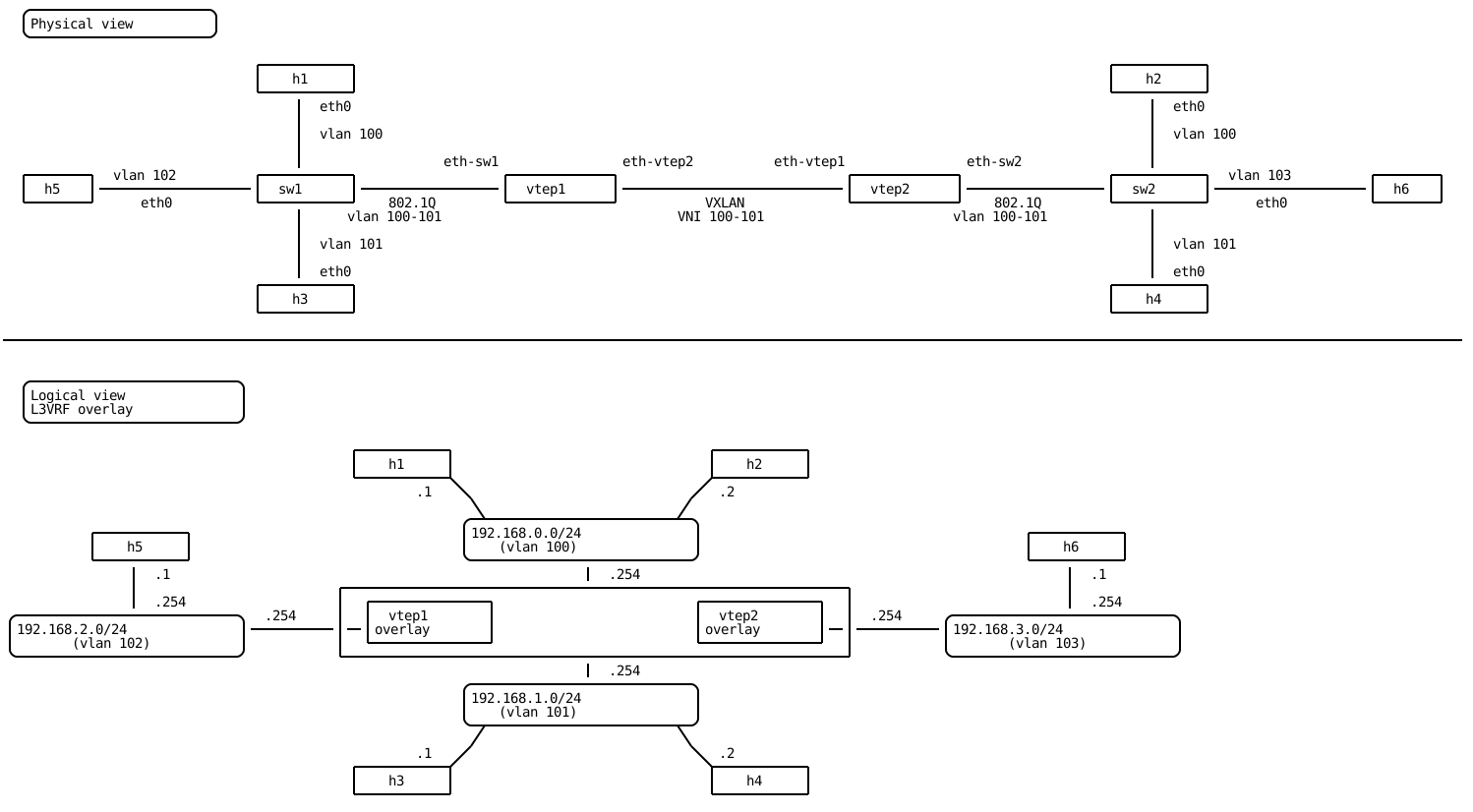
Hosts h5 and h6 are added to the existing topology and connected to separate subnets on L3VRF overlay: 192.168.2.0/24 and 192.168.3.0/24, respectively. These subnets are assigned to VLAN 102 and 103. These layer-2 domains are not extended through the VXLAN tunnel.
This section explains how to enable communication between a local host connected to a VNI and a remote host connected to a local VLAN only, through the VXLAN tunnel.
vtep1 running config# / vrf main l3vrf overlay interface vlan eth-sw1.102 vlan-id 102
vtep1 running config#! / vrf main l3vrf overlay interface vlan eth-sw1.102 link-interface eth-sw1
vtep1 running config# / vrf main l3vrf overlay interface vlan eth-sw1.102 ipv4 address 192.168.2.254/24
vtep1 running config# / routing ipv4-prefix-list PLIST-CONNECTED seq 10 address 192.168.2.0/24 policy permit
vtep1 running config# / routing route-map RMAP-CONNECTED seq 10 match ip address prefix-list PLIST-CONNECTED
vtep1 running config#! / routing route-map RMAP-CONNECTED seq 10 policy permit
vtep1 running config# / vrf main l3vrf overlay routing bgp address-family ipv4-unicast redistribute connected route-map RMAP-CONNECTED
vtep1 running config# / vrf main l3vrf overlay routing bgp address-family l2vpn-evpn advertisement ipv4-unicast
vtep2 running config# / vrf main l3vrf overlay interface vlan eth-sw2.103 vlan-id 103
vtep2 running config#! / vrf main l3vrf overlay interface vlan eth-sw2.103 link-interface eth-sw2
vtep2 running config# / vrf main l3vrf overlay interface vlan eth-sw2.103 ipv4 address 192.168.3.254/24
vtep2 running config# / routing ipv4-prefix-list PLIST-CONNECTED seq 10 address 192.168.3.0/24 policy permit
vtep2 running config# / routing route-map RMAP-CONNECTED seq 10 match ip address prefix-list PLIST-CONNECTED
vtep2 running config#! / routing route-map RMAP-CONNECTED seq 10 policy permit
vtep2 running config# / vrf main l3vrf overlay routing bgp address-family ipv4-unicast redistribute connected route-map RMAP-CONNECTED
vtep2 running config# / vrf main l3vrf overlay routing bgp address-family l2vpn-evpn advertisement ipv4-unicast
Hosts h1 is able to ping h6.
root@h1:~# ping -c1 192.168.3.1
PING 192.168.3.1 (192.168.3.1) 56(84) bytes of data.
64 bytes from 192.168.3.1: icmp_seq=1 ttl=62 time=1.31 ms

--- 192.168.3.1 ping statistics ---
1 packets transmitted, 1 received, 0% packet loss, time 0ms
rtt min/avg/max/mdev = 1.312/1.312/1.312/0.000 ms
EVPN RT-5 prefixes are now present in the EVPN BGP table:
vtep1> show bgp l2vpn evpn
BGP table version is 10, local router ID is 10.125.0.1
Status codes: s suppressed, d damped, h history, * valid, > best, i - internal
Origin codes: i - IGP, e - EGP, ? - incomplete
EVPN type-1 prefix: [1]:[EthTag]:[ESI]:[IPlen]:[VTEP-IP]:[Frag-id]
EVPN type-2 prefix: [2]:[EthTag]:[MAClen]:[MAC]:[IPlen]:[IP]
EVPN type-3 prefix: [3]:[EthTag]:[IPlen]:[OrigIP]
EVPN type-4 prefix: [4]:[ESI]:[IPlen]:[OrigIP]
EVPN type-5 prefix: [5]:[EthTag]:[IPlen]:[IP]

   Network          Next Hop            Metric LocPrf Weight Path
Route Distinguisher: 10.125.0.1:2
 *> [2]:[0]:[48]:[de:ed:01:d0:52:5f]
                    10.125.0.1                         32768 i
                    ET:8 RT:65000:100
 *> [2]:[0]:[48]:[de:ed:01:d0:52:5f]:[32]:[192.168.0.1]
                    10.125.0.1                         32768 i
                    ET:8 RT:65000:100 RT:65000:300 Rmac:82:cc:f3:0d:32:d9
Route Distinguisher: 10.125.0.1:3
 *> [2]:[0]:[48]:[de:ed:01:d1:53:51]
                    10.125.0.1                         32768 i
                    ET:8 RT:65000:101
 *> [2]:[0]:[48]:[de:ed:01:d1:53:51]:[32]:[192.168.1.1]
                    10.125.0.1                         32768 i
                    ET:8 RT:65000:101 RT:65000:300 Rmac:82:cc:f3:0d:32:d9
Route Distinguisher: 10.125.0.1:4
 *> [5]:[0]:[24]:[192.168.2.0]
                    0.0.0.0                  0         32768 ?
                    ET:8 RT:65000:300 Rmac:82:cc:f3:0d:32:d9
Route Distinguisher: 10.125.0.2:2
 *>i[2]:[0]:[48]:[de:ed:01:dc:0e:62]
                    10.125.0.2                    100      0 i
                    RT:65000:100 ET:8
 *>i[2]:[0]:[48]:[de:ed:01:dc:0e:62]:[32]:[192.168.0.2]
                    10.125.0.2                    100      0 i
                    RT:65000:100 RT:65000:300 ET:8 Rmac:6a:0e:5b:06:2b:bd
Route Distinguisher: 10.125.0.2:3
 *>i[2]:[0]:[48]:[de:ed:01:df:ce:6f]
                    10.125.0.2                    100      0 i
                    RT:65000:101 ET:8
 *>i[2]:[0]:[48]:[de:ed:01:df:ce:6f]:[32]:[192.168.1.2]
                    10.125.0.2                    100      0 i
                    RT:65000:101 RT:65000:300 ET:8 Rmac:6a:0e:5b:06:2b:bd
Route Distinguisher: 10.125.0.2:4
 *>i[5]:[0]:[24]:[192.168.3.0]
                    10.125.0.2               0    100      0 ?
                    RT:65000:300 ET:8 Rmac:6a:0e:5b:06:2b:bd

Displayed 10 out of 10 total prefixes
And they are installed into the overlay L3VRF routing-table:
vtep1> show ipv4-routes l3vrf overlay
Codes: K - kernel route, C - connected, S - static, R - RIP,
       O - OSPF, I - IS-IS, B - BGP, N - NHRP, T - Table
       > - selected route, * - FIB route, r - rejected, b - backup

L3VRF overlay:
K>* 0.0.0.0/0 [255/8192] unreachable (ICMP unreachable), 00:00:30
C>* 192.168.0.0/24 is directly connected, br100, 00:00:29
B>* 192.168.0.2/32 [200/0] via 10.125.0.2, br300 onlink, weight 1, 00:00:03
C>* 192.168.1.0/24 is directly connected, br101, 00:00:20
B>* 192.168.1.2/32 [200/0] via 10.125.0.2, br300 onlink, weight 1, 00:00:03
C>* 192.168.2.0/24 is directly connected, eth-sw1.102, 00:00:03
B>* 192.168.3.0/24 [200/0] via 10.125.0.2, br300 onlink, weight 1, 00:00:02

7 routes displayed.
The following configuration examples show the complete configuration used throughout this section:
vtep1> show config fullpath nodefault / vrf main
/ vrf main l3vrf overlay table-id 1000
/ vrf main l3vrf overlay interface bridge br100 ipv4 address 192.168.0.254/24
/ vrf main l3vrf overlay interface bridge br100 link-interface eth-sw1.100
/ vrf main l3vrf overlay interface bridge br100 link-interface vxlan100 neighbor-suppress true
/ vrf main l3vrf overlay interface bridge br101 ipv4 address 192.168.1.254/24
/ vrf main l3vrf overlay interface bridge br101 link-interface eth-sw1.101
/ vrf main l3vrf overlay interface bridge br101 link-interface vxlan101 neighbor-suppress true
/ vrf main l3vrf overlay interface bridge br300 link-interface vxlan300
/ vrf main l3vrf overlay interface vlan eth-sw1.102 ipv4 address 192.168.2.254/24
/ vrf main l3vrf overlay interface vlan eth-sw1.102 vlan-id 102
/ vrf main l3vrf overlay interface vlan eth-sw1.102 link-interface eth-sw1
/ vrf main l3vrf overlay routing bgp l3vni 300
/ vrf main l3vrf overlay routing bgp address-family ipv4-unicast redistribute connected route-map RMAP-CONNECTED
/ vrf main l3vrf overlay routing bgp address-family l2vpn-evpn advertisement ipv4-unicast
/ vrf main interface physical eth-sw1 port pci-b0s4
/ vrf main interface physical eth-vtep2 ipv4 address 10.125.0.1/24
/ vrf main interface physical eth-vtep2 port pci-b0s5
/ vrf main interface vlan eth-sw1.100 vlan-id 100
/ vrf main interface vlan eth-sw1.100 link-interface eth-sw1
/ vrf main interface vlan eth-sw1.101 vlan-id 101
/ vrf main interface vlan eth-sw1.101 link-interface eth-sw1
/ vrf main interface vxlan vxlan100 vni 100
/ vrf main interface vxlan vxlan100 link-interface eth-vtep2
/ vrf main interface vxlan vxlan100 learning false
/ vrf main interface vxlan vxlan101 vni 101
/ vrf main interface vxlan vxlan101 link-interface eth-vtep2
/ vrf main interface vxlan vxlan101 learning false
/ vrf main interface vxlan vxlan300 vni 300
/ vrf main interface vxlan vxlan300 link-interface eth-vtep2
/ vrf main routing bgp as 65000
/ vrf main routing bgp router-id 10.125.0.1
/ vrf main routing bgp address-family l2vpn-evpn flooding disabled
/ vrf main routing bgp address-family l2vpn-evpn advertise-all-vni true
/ vrf main routing bgp neighbor 10.125.0.2 remote-as internal
/ vrf main routing bgp neighbor 10.125.0.2 address-family ipv4-unicast enabled false
/ vrf main routing bgp neighbor 10.125.0.2 address-family l2vpn-evpn
vtep2> show config fullpath nodefault / vrf main
/ vrf main l3vrf overlay table-id 1000
/ vrf main l3vrf overlay interface bridge br100 ipv4 address 192.168.0.254/24
/ vrf main l3vrf overlay interface bridge br100 link-interface eth-sw2.100
/ vrf main l3vrf overlay interface bridge br100 link-interface vxlan100 neighbor-suppress true
/ vrf main l3vrf overlay interface bridge br101 ipv4 address 192.168.1.254/24
/ vrf main l3vrf overlay interface bridge br101 link-interface eth-sw2.101
/ vrf main l3vrf overlay interface bridge br101 link-interface vxlan101 neighbor-suppress true
/ vrf main l3vrf overlay interface bridge br300 link-interface vxlan300
/ vrf main l3vrf overlay interface vlan eth-sw2.103 ipv4 address 192.168.3.254/24
/ vrf main l3vrf overlay interface vlan eth-sw2.103 vlan-id 103
/ vrf main l3vrf overlay interface vlan eth-sw2.103 link-interface eth-sw2
/ vrf main l3vrf overlay routing bgp l3vni 300
/ vrf main l3vrf overlay routing bgp address-family ipv4-unicast redistribute connected route-map RMAP-CONNECTED
/ vrf main l3vrf overlay routing bgp address-family l2vpn-evpn advertisement ipv4-unicast
/ vrf main interface physical eth-sw2 port pci-b0s4
/ vrf main interface physical eth-vtep1 ipv4 address 10.125.0.2/24
/ vrf main interface physical eth-vtep1 port pci-b0s5
/ vrf main interface vlan eth-sw2.100 vlan-id 100
/ vrf main interface vlan eth-sw2.100 link-interface eth-sw2
/ vrf main interface vlan eth-sw2.101 vlan-id 101
/ vrf main interface vlan eth-sw2.101 link-interface eth-sw2
/ vrf main interface vxlan vxlan100 vni 100
/ vrf main interface vxlan vxlan100 link-interface eth-vtep1
/ vrf main interface vxlan vxlan100 learning false
/ vrf main interface vxlan vxlan101 vni 101
/ vrf main interface vxlan vxlan101 link-interface eth-vtep1
/ vrf main interface vxlan vxlan101 learning false
/ vrf main interface vxlan vxlan300 vni 300
/ vrf main interface vxlan vxlan300 link-interface eth-vtep1
/ vrf main routing bgp as 65000
/ vrf main routing bgp router-id 10.125.0.2
/ vrf main routing bgp address-family l2vpn-evpn flooding disabled
/ vrf main routing bgp address-family l2vpn-evpn advertise-all-vni true
/ vrf main routing bgp neighbor 10.125.0.1 remote-as internal
/ vrf main routing bgp neighbor 10.125.0.1 address-family ipv4-unicast enabled false
/ vrf main routing bgp neighbor 10.125.0.1 address-family l2vpn-evpn
Configuring IPv6
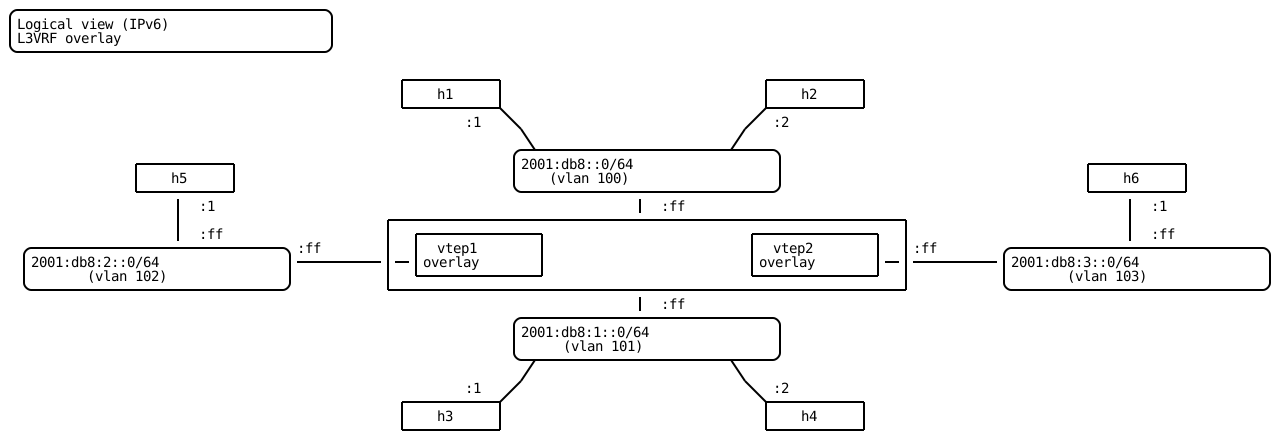
IPv6 is added to the topology using the addresses of the following diagram.
vtep1 running config# / vrf main l3vrf overlay interface bridge br100 ipv6 address 2001:db8:0::ff/64
vtep1 running config# / vrf main l3vrf overlay interface bridge br101 ipv6 address 2001:db8:1::ff/64
vtep1 running config# / vrf main l3vrf overlay interface vlan eth-sw1.102 ipv6 address 2001:db8:2::ff/64
vtep1 running config# / routing ipv6-prefix-list PLIST6-CONNECTED seq 10 address 2001:db8:2::/64 policy permit
vtep1 running config# / routing route-map RMAP6-CONNECTED seq 10 match ipv6 address prefix-list PLIST6-CONNECTED
vtep1 running config#! / routing route-map RMAP6-CONNECTED seq 10 policy permit
vtep1 running config# / vrf main l3vrf overlay routing bgp address-family l2vpn-evpn advertisement ipv6-unicast
vtep1 running ipv6-unicast# / vrf main l3vrf overlay routing bgp address-family ipv6-unicast redistribute connected route-map RMAP6-CONNECTED
vtep2 running config# / vrf main l3vrf overlay interface bridge br100 ipv6 address 2001:db8:0::ff/64
vtep2 running config# / vrf main l3vrf overlay interface bridge br101 ipv6 address 2001:db8:1::ff/64
vtep2 running config# / vrf main l3vrf overlay interface vlan eth-sw2.103 ipv6 address 2001:db8:3::ff/64
vtep2 running config# / routing ipv6-prefix-list PLIST6-CONNECTED seq 10 address 2001:db8:3::/64 policy permit
vtep2 running config# / routing route-map RMAP6-CONNECTED seq 10 match ipv6 address prefix-list PLIST6-CONNECTED
vtep2 running config#! / routing route-map RMAP6-CONNECTED seq 10 policy permit
vtep2 running config# / vrf main l3vrf overlay routing bgp address-family l2vpn-evpn advertisement ipv6-unicast
vtep2 running ipv6-unicast# / vrf main l3vrf overlay routing bgp address-family ipv6-unicast redistribute connected route-map RMAP6-CONNECTED
EVPN RT-2 and RT-5 IPv6 prefixes are now present in the EVPN BGP table:
vtep1> show bgp l2vpn evpn
BGP table version is 12, local router ID is 10.125.0.1
Status codes: s suppressed, d damped, h history, * valid, > best, i - internal
Origin codes: i - IGP, e - EGP, ? - incomplete
EVPN type-1 prefix: [1]:[EthTag]:[ESI]:[IPlen]:[VTEP-IP]:[Frag-id]
EVPN type-2 prefix: [2]:[EthTag]:[MAClen]:[MAC]:[IPlen]:[IP]
EVPN type-3 prefix: [3]:[EthTag]:[IPlen]:[OrigIP]
EVPN type-4 prefix: [4]:[ESI]:[IPlen]:[OrigIP]
EVPN type-5 prefix: [5]:[EthTag]:[IPlen]:[IP]

   Network          Next Hop            Metric LocPrf Weight Path
Route Distinguisher: 10.125.0.1:2
 *> [2]:[0]:[48]:[de:ed:01:d0:52:5f]
                    10.125.0.1                         32768 i
                    ET:8 RT:65000:100
 *> [2]:[0]:[48]:[de:ed:01:d0:52:5f]:[32]:[192.168.0.1]
                    10.125.0.1                         32768 i
                    ET:8 RT:65000:100 RT:65000:300 Rmac:82:cc:f3:0d:32:d9
 *> [2]:[0]:[48]:[de:ed:01:d0:52:5f]:[128]:[2001:db8::1]
                    10.125.0.1                         32768 i
                    ET:8 RT:65000:100 RT:65000:300 Rmac:82:cc:f3:0d:32:d9 ND:Router Flag
Route Distinguisher: 10.125.0.1:3
 *> [2]:[0]:[48]:[de:ed:01:d1:53:51]
                    10.125.0.1                         32768 i
                    ET:8 RT:65000:101
 *> [2]:[0]:[48]:[de:ed:01:d1:53:51]:[32]:[192.168.1.1]
                    10.125.0.1                         32768 i
                    ET:8 RT:65000:101 RT:65000:300 Rmac:82:cc:f3:0d:32:d9
 *> [2]:[0]:[48]:[de:ed:01:d1:53:51]:[128]:[2001:db8:1::1]
                    10.125.0.1                         32768 i
                    ET:8 RT:65000:101 RT:65000:300 Rmac:82:cc:f3:0d:32:d9
 *> [2]:[0]:[48]:[de:ed:01:d1:53:51]:[128]:[fe80::dced:1ff:fed1:5351]
                    10.125.0.1                         32768 i
                    ET:8 RT:65000:101
Route Distinguisher: 10.125.0.1:4
 *> [5]:[0]:[24]:[192.168.2.0]
                    0.0.0.0                  0         32768 ?
                    ET:8 RT:65000:300 Rmac:82:cc:f3:0d:32:d9
 *> [5]:[0]:[64]:[2001:db8:2::]
                    0.0.0.0                  0         32768 ?
                    ET:8 RT:65000:300 Rmac:82:cc:f3:0d:32:d9
Route Distinguisher: 10.125.0.2:2
 *>i[2]:[0]:[48]:[de:ed:01:dc:0e:62]
                    10.125.0.2                    100      0 i
                    RT:65000:100 ET:8
 *>i[2]:[0]:[48]:[de:ed:01:dc:0e:62]:[32]:[192.168.0.2]
                    10.125.0.2                    100      0 i
                    RT:65000:100 RT:65000:300 ET:8 Rmac:6a:0e:5b:06:2b:bd
 *>i[2]:[0]:[48]:[de:ed:01:dc:0e:62]:[128]:[2001:db8::2]
                    10.125.0.2                    100      0 i
                    RT:65000:100 RT:65000:300 ET:8 Rmac:6a:0e:5b:06:2b:bd
Route Distinguisher: 10.125.0.2:3
 *>i[2]:[0]:[48]:[de:ed:01:df:ce:6f]
                    10.125.0.2                    100      0 i
                    RT:65000:101 ET:8
 *>i[2]:[0]:[48]:[de:ed:01:df:ce:6f]:[32]:[192.168.1.2]
                    10.125.0.2                    100      0 i
                    RT:65000:101 RT:65000:300 ET:8 Rmac:6a:0e:5b:06:2b:bd
 *>i[2]:[0]:[48]:[de:ed:01:df:ce:6f]:[128]:[2001:db8:1::2]
                    10.125.0.2                    100      0 i
                    RT:65000:101 RT:65000:300 ET:8 Rmac:6a:0e:5b:06:2b:bd
 *>i[2]:[0]:[48]:[de:ed:01:df:ce:6f]:[128]:[fe80::dced:1ff:fedf:ce6f]
                    10.125.0.2                    100      0 i
                    RT:65000:101 ET:8
Route Distinguisher: 10.125.0.2:4
 *>i[5]:[0]:[24]:[192.168.3.0]
                    10.125.0.2               0    100      0 ?
                    RT:65000:300 ET:8 Rmac:6a:0e:5b:06:2b:bd
 *>i[5]:[0]:[64]:[2001:db8:3::]
                    10.125.0.2               0    100      0 ?
                    RT:65000:300 ET:8 Rmac:6a:0e:5b:06:2b:bd

Displayed 18 out of 18 total prefixes
And they are installed into the overlay L3VRF routing-table:
vtep1> show ipv6-routes l3vrf overlay
Codes: K - kernel route, C - connected, S - static, R - RIPng,
       O - OSPFv3, I - IS-IS, B - BGP, N - NHRP, T - Table, 6 - 6PE, p - SRTE,
       > - selected route, * - FIB route, r - rejected, b - backup

L3VRF overlay:
K>* ::/0 [255/8192] unreachable (ICMP unreachable), 00:00:46
C>* 2001:db8::/64 is directly connected, br100, 00:00:08
B>* 2001:db8::2/128 [200/0] via ::ffff:10.125.0.2, br300 onlink, weight 1, 00:00:00
C>* 2001:db8:1::/64 is directly connected, br101, 00:00:09
B>* 2001:db8:1::2/128 [200/0] via ::ffff:10.125.0.2, br300 onlink, weight 1, 00:00:04
C>* 2001:db8:2::/64 is directly connected, eth-sw1.102, 00:00:08
B>* 2001:db8:3::/64 [200/0] via ::ffff:10.125.0.2, br300 onlink, weight 1, 00:00:07
C * fe80::/64 is directly connected, eth-sw1.102, 00:00:18
C * fe80::/64 is directly connected, br300, 00:00:26
C * fe80::/64 is directly connected, br101, 00:00:35
C>* fe80::/64 is directly connected, br100, 00:00:44

11 routes displayed.