Lawful Interception
Overview
ETSI describes Lawful Interception function in TS 103 221-1 and TS 103 221-2 standard. 6WIND Virtual Service Router implements Network Equipement Lawful Interception function.
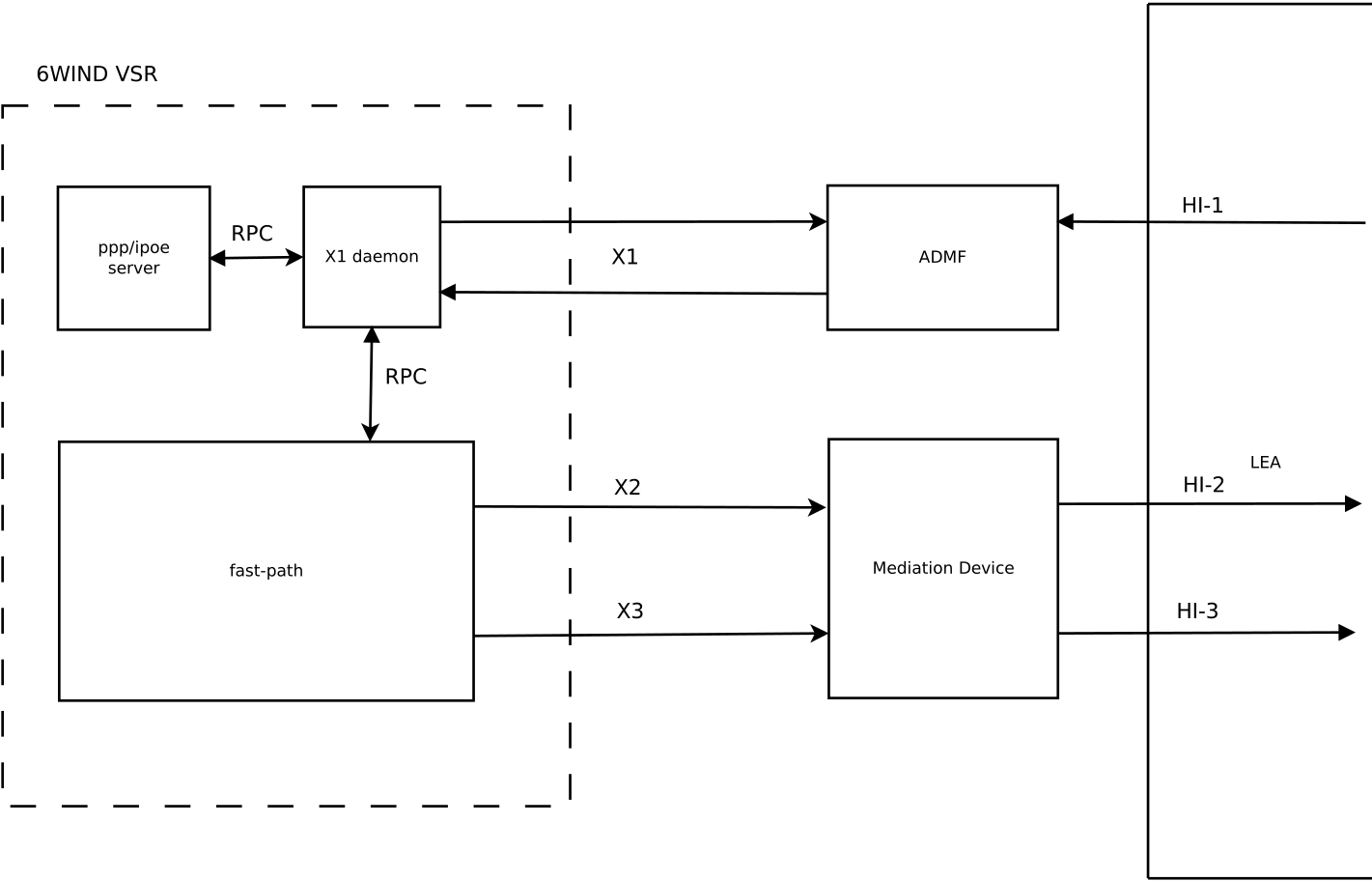
By default, once activated, all Virtual Service Router traffic may be intercepted according to Task Target Identifiers. Lawful Interception can be restricted on a specific VRF.
Note
If Task Target Identifiers do not identify a unique object, no interception will be performed.
Supported Target Identifiers
The following table shows all Target Identifiers combinations 6WIND Virtual Service Router supports.
Target Identifier |
Supported |
|---|---|
Radius |
Yes |
Configuration examples
By default, Lawful Interception is disabled. You can activate it by configuring X1, X2 and X3, it is done thanks to the control (for X1) and delivery (X2,X3) words.
The Lawful Interception configuration needs at least 2 certificates to import:
The Virtual Service Router machine certificate.
The MDF certificate store.
vsr running config# / vrf main lawful-interception enabled true
vsr running config#! / vrf main lawful-interception control source-ipv4 10.100.0.2
vsr running config#! / vrf main lawful-interception control identifier admf
vsr running config#! / vrf main lawful-interception control local-certificate vsr_cert
vsr running config#! / vrf main lawful-interception control trust certificate-store mdf_cert
vsr running config#! / vrf main lawful-interception delivery source-ipv4 10.100.0.2
vsr running config#! / vrf main lawful-interception delivery local-certificate vsr_cert
vsr running config#! / vrf main lawful-interception delivery trust certificate-store mdf_cert
See also
The Import certificate command reference for details.
The state of the lawful-interception service configuration can be checked with the following command:
vsr> show state / vrf main lawful-interception
lawful-interception
    enabled true
    control
        source-ipv4 10.100.0.2
        idle-probe-interval 3600
        idle-probe-timeout 60
        port 443
        identifier admf
        local-certificate vsr_cert
        trust
            certificate-store mdf_cert
            ..
        ..
    delivery
        source-ipv4 10.100.0.2
        keepalive-interval 60
        keepalive-timeout 180
        local-certificate vsr_cert
        trust
            certificate-store mdf_cert
            ..
        ..
    ..
The same configuration can be made using this NETCONF XML configuration:
vsr> show config xml absolute vrf main lawful-interception
<config xmlns="urn:6wind:vrouter">
  <vrf>
    <name>main</name>
    <lawful-interception xmlns="urn:6wind:vrouter/lawful-interception">
      <enabled>true</enabled>
      <control>
        <source-ipv4>10.100.0.2</source-ipv4>
        <idle-probe-interval>3600</idle-probe-interval>
        <idle-probe-timeout>60</idle-probe-timeout>
        <port>443</port>
        <identifier>admf</identifier>
        <local-certificate>vsr_cert</local-certificate>
        <trust>
          <certificate-store>mdf_cert</certificate-store>
        </trust>
      </control>
      <delivery>
        <source-ipv4>10.100.0.2</source-ipv4>
        <keepalive-interval>60</keepalive-interval>
        <keepalive-timeout>180</keepalive-timeout>
        <local-certificate>vsr_cert</local-certificate>
        <trust>
          <certificate-store>mdf_cert</certificate-store>
        </trust>
      </delivery>
    </lawful-interception>
  </vrf>
</config>
Lawful Interception RPCs are available to admin roles.
In order to specifically grant access to Lawful Interception RPCs, a role must be created, with a user using this new role.
Note
See Users section for more details.
Here is an example for a local user.
vsr running config# / system auth user li_op1 role li-operator password $0$test
vsr running config# / system auth role li-operator permit rpc vrouter-lawful-interception:show-lawful-interception-admfs
vsr running rpc vrouter-lawful-interception:show-lawful-interception-admfs# / system auth role li-operator permit rpc vrouter-lawful-interception:show-lawful-interception-tasks
The following permissions are configured for the li_op1 user, who has access to Lawful Interception RPCs :
vsr> show user permissions li_op1
li_op1 user roles: li-operator

rule                                                           action
====                                                           ======
rpc vrouter-lawful-interception:show-lawful-interception-admfs permit
rpc vrouter-lawful-interception:show-lawful-interception-tasks permit
rpc vrouter-commands:convert-to-text                           permit
rpc vrouter-commands:get-command-status                        permit
rpc vrouter-commands:refresh-command                           permit
rpc vrouter-commands:stop-command                              permit
rpc vrouter-commands:get-completion                            permit
rpc vrouter-commands:get-features                              permit
List ADMFs
A list of currently associated ADMFs can be shown with the following command:
vsr> show lawful-interception admfs
Id      Host
==      ====
ADMF001 10.100.0.1
See also
The command reference for details.
List running interceptions
A list of currently running interceptions can be dumped with the following command:
vsr> show lawful-interception tasks admf ADMF001
XId                                  Delivery Type Target                                Destination
===                                  ============= ======                                ===========
00000000-0000-0000-0000-00000000007b x3            radius-attribute:010a6a6f686e2e646f65 MDF001@10.100.0.1:7777
See also
The command reference for details.