Path Monitoring
Monitoring the availability of IP addresses
The icmp tracker service provides helpers to monitor the availability of IP addresses, using ICMP echo requests.
In the following example, the router has two links to reach the server: the main link and the backup link. Trackers can be used to monitor the availability of the server through both links, and configure static routing accordingly. An higher priority is assigned to the main link, using the distance parameter in the static routing context.
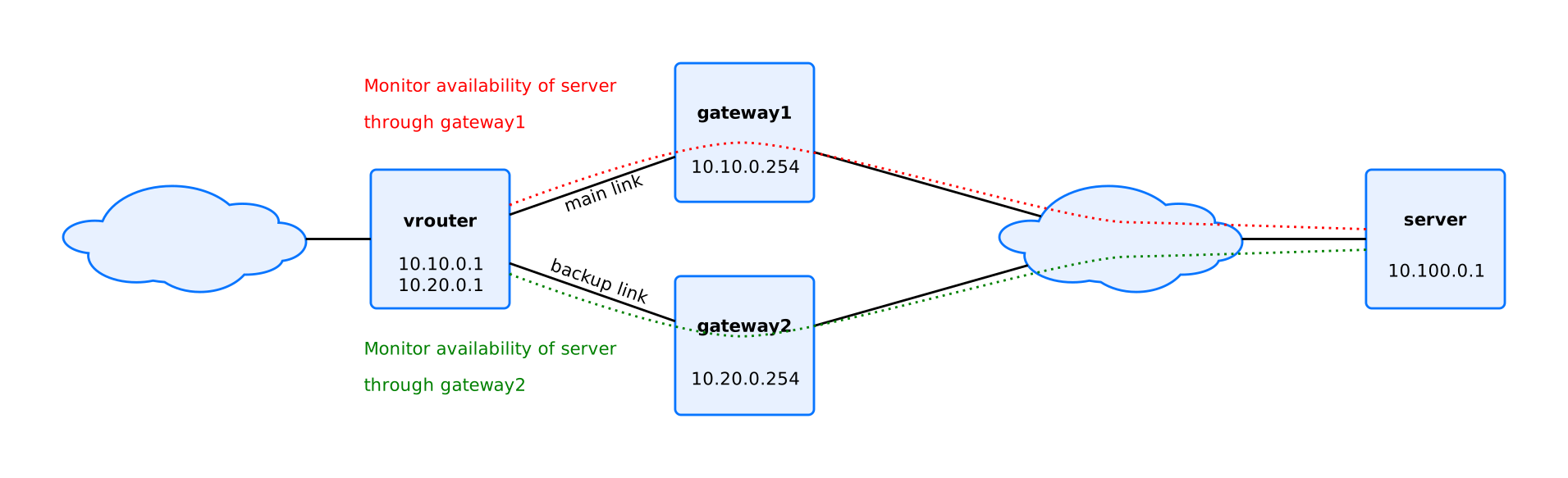
This can be configured as follows:
vsr running config# / tracker
vsr running tracker# icmp main vrf main address 10.100.0.1 gateway 10.10.0.254 source 10.10.0.1
vsr running tracker# icmp backup vrf main address 10.100.0.1 gateway 10.20.0.254 source 10.20.0.1
vsr running tracker# / vrf main routing static
vsr running static# ipv4-route 10.100.0.0/16
vsr running ipv4-route 10.100.0.0/16#! next-hop 10.10.0.254 track main distance 1
vsr running ipv4-route 10.100.0.0/16# next-hop 10.20.0.254 track backup distance 2
To display the trackers state:
vsr running config# / tracker
vsr running tracker# show state
tracker
    icmp main address 10.100.0.1 vrf main source 10.10.0.1 gateway 10.10.0.254 period 500 threshold 1 total 1 discriminator 583249321 state down diagnostic timeout type icmp-echo
    icmp backup address 10.100.0.1 vrf main source 10.20.0.1 gateway 10.20.0.254 period 500 threshold 1 total 1 discriminator 489368122 state up diagnostic ok type icmp-echo
    ..
The same configuration can be made using this NETCONF XML configuration:
vsr running config# show config xml
<config xmlns="urn:6wind:vrouter">
  <tracker xmlns="urn:6wind:vrouter/tracker">
    <icmp xmlns="urn:6wind:vrouter/tracker/icmp">
      <name>main</name>
      <vrf>main</vrf>
      <address>10.100.0.1</address>
      <gateway>10.10.0.254</gateway>
      <source>10.10.0.1</source>
      <period>500</period>
      <threshold>5</threshold>
      <total>10</total>
      <packet-size>100</packet-size>
      <packet-tos>192</packet-tos>
      <timeout>500</timeout>
    </icmp>
    <icmp xmlns="urn:6wind:vrouter/tracker/icmp">
      <name>backup</name>
      <vrf>main</vrf>
      <address>10.100.0.1</address>
      <gateway>10.20.0.254</gateway>
      <source>10.20.0.1</source>
      <period>500</period>
      <threshold>5</threshold>
      <total>10</total>
      <packet-size>100</packet-size>
      <packet-tos>192</packet-tos>
      <timeout>500</timeout>
    </icmp>
  </tracker>
  <vrf>
    <name>main</name>
    <routing xmlns="urn:6wind:vrouter/routing">
      <static>
        <ipv4-route>
          <destination>10.100.0.0/16</destination>
          <next-hop>
            <next-hop>10.10.0.254</next-hop>
            <track>main</track>
            <distance>1</distance>
          </next-hop>
          <next-hop>
            <next-hop>10.20.0.254</next-hop>
            <track>backup</track>
            <distance>2</distance>
          </next-hop>
        </ipv4-route>
      </static>
    </routing>
    <network-stack xmlns="urn:6wind:vrouter/system">
      <icmp/>
      <ipv4/>
      <ipv6/>
      <neighbor/>
      <conntrack/>
    </network-stack>
    <interface xmlns="urn:6wind:vrouter/interface"/>
    <logging xmlns="urn:6wind:vrouter/logging"/>
  </vrf>
</config>
See also
Monitoring the latency of IP addresses
The icmp-rtt tracker service provides helpers to monitor the latency of IP addresses, using ICMP echo requests.
This tracker will periodically send a set of ICMP echo requests in order to calculate minimal, maximal and average Round Trip Time (RTT) values in microseconds. It also provide a loss-ratio to notify about not received ICMP echo responses.
To configure an icmp-rtt tracker that will send 5 ICMP echo requests every 5 seconds:
vsr running config# / tracker
vsr running tracker# icmp-rtt rtt vrf main address 10.100.0.1 source 10.100.0.2 count 5 interval 5000
To display the trackers state:
vsr running config# / tracker
vsr running tracker# show state
tracker
    icmp-rtt rtt address 10.100.0.1 vrf main source 10.100.0.2 period 5000 count 5 timestamp "2023-09-25 17:55:40.742318" min-rtt 5866 max-rtt 5898 average-rtt 5883 loss-ratio 0
    ..
Monitoring IP addresses within an L3VRF
Trackers can be configured to initiate monitoring sessions from within a specific L3VRF (Layer 3 Virtual Routing and Forwarding) context. This is useful for multi-tenancy scenarios, VPN environments, or when monitoring destinations that are only reachable through specific routing tables.
The l3vrf parameter specifies the routing context from which the ICMP packets
will be sent, allowing the tracker to use the routing table and network configuration
of that specific L3VRF.
ICMP tracker with L3VRF
In the following example, a tracker monitors a server that is reachable through
an L3VRF named l3vrf1. This is commonly used in multi-tenant scenarios where
different routing contexts need to be isolated:
vsr running config# / tracker icmp vpn-server vrf main l3vrf l3vrf1 address 10.100.0.1 source 10.20.0.1
This configuration creates a tracker that:
Runs in the
mainnetwork namespace (vrf main)Sends ICMP packets from the
l3vrf1routing contextMonitors the IP address
10.100.0.1Uses
10.20.0.1as the source address
ICMP-RTT tracker with L3VRF
Similarly, latency monitoring can be performed within an L3VRF using the icmp-rtt tracker:
vsr running config# / tracker icmp-rtt vpn-latency vrf main l3vrf l3vrf1 address 10.100.0.1 source 10.20.0.1 count 5 period 3000
Displaying tracker state for a specific L3VRF
To display only the path monitoring sessions for a specific L3VRF, use the
l3vrf parameter with the show command:
vsr> show path-monitoring vrf main l3vrf l3vrf1
Pm Sessions status
 session 10.100.0.1 local-address 10.20.0.1 type icmp_sla vrf l3vrf1
     notify /run/yams/tracker/vpn-latency
     label vpn-latency
     packet-tos 192, packet-size 100, interval 3000, count 5
     status: (0x26) session admin up, run stopped
              init (unreachable)
 session 10.100.0.1 local-address 10.20.0.1 type icmp_echo vrf l3vrf1
     notify /run/yams/tracker/vpn-server
     label vpn-server
     packet-tos 192, packet-size 100, interval 500, timeout 500
     retries mode threshold
     retries threshold 1 total 1
     retries up-count 1 down-count 1
     status: (0x26) session admin up, run stopped
              init (unreachable)
You can also combine this with the operational parameter to see runtime statistics:
vsr> show path-monitoring vrf main l3vrf l3vrf1 operational
Pm Sessions status
 session 10.100.0.1 local-address 10.20.0.1 type icmp_sla vrf l3vrf1
     notify /run/yams/tracker/vpn-latency
     label vpn-latency
 session 10.100.0.1 local-address 10.20.0.1 type icmp_echo vrf l3vrf1
     notify /run/yams/tracker/vpn-server
     label vpn-server
Note
The L3VRF must be properly configured within the VRF before being used in a tracker. Refer to the L3VRF configuration guide for details on creating and managing L3VRFs.