Editing the running configuration
The edition model is transactional. The running configuration is first fetched locally. This local copy, called staging configuration, can be modified locally, then committed. The running configuration can be set as startup configuration.
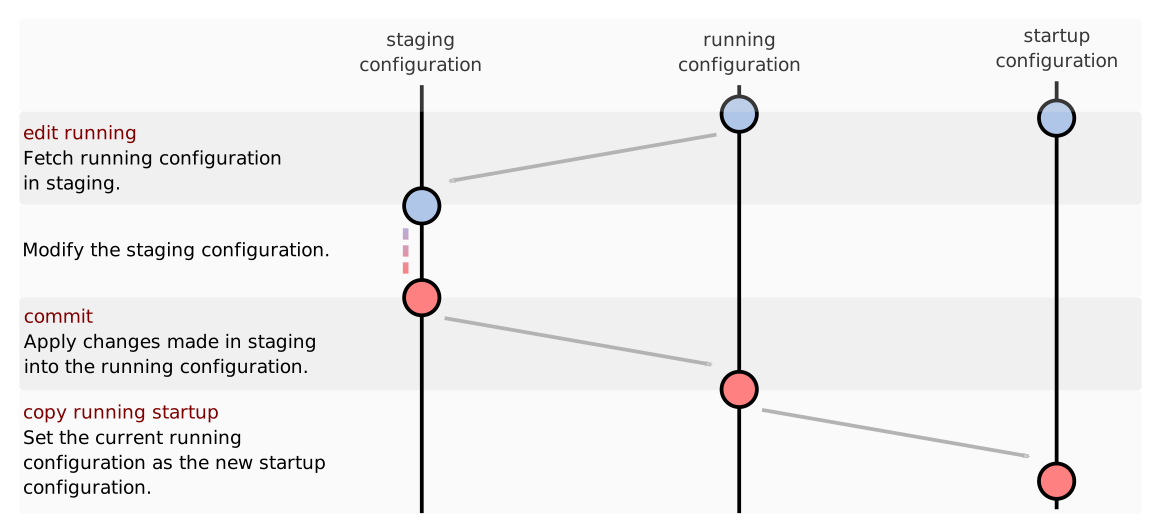
Enter into the edition mode with:
vsr> edit running
vsr running config#
In edition mode, the prompt is composed of:
the hostname,
the name of the configuration being edited (here
running),the path of the current node in the configuration tree (here
/, which means we are at the root),a
#, meaning we are in the edition mode.
After each command, the staging configuration is validated. A ! is displayed
at the end of the prompt when it is invalid regarding the constraints defined in
the YANG model.
By default, the validation is not done when the CLI detects that other commands
are pending in the input buffer. This optimizes the loading of large configurations
(thousands of objects). This behavior is customizable from the cliconfig context,
by changing validate-after-edit to always or never. When the configuration
is modified without being validated, a ? is displayed at the end of the prompt.
The validate command can then be used to check what is invalid in the
configuration:
vsr running config# / vrf main interface physical eth1
vsr running physical eth1#? validate
ERROR: / vrf main interface physical eth1:
  Mandatory node "port" instance does not exist.
Invalid configuration.
vsr running physical eth1#! / vrf main interface physical eth1 port pci-b0s4
vsr running physical eth1# validate
OK.
In edition mode, the user can:
modify the staging configuration (ex:
vrf main ssh-server)show the staging configuration (ex:
show config)commit the changes (ex:
commit)commit the changes without checking for conflict with another commit (ex:
commit force)commit the changes with a description (ex:
commit description "Configure interface eth0")commit the changes with confirmation (ex:
commit confirmed period 60 persist-id 1)cancel a (confirmed) commit: (ex:
cancelorcancel persist-id 1)confirm a (confirmed) commit (ex:
confirmorconfirm persist-id 1)discard the changes (ex:
exit)display the help of a command (ex:
help show)retrieve the state of the device (ex:
show state)update the startup configuration of the device (
copy running startup) (The startup configuration may contain encrypted data.)send commands (ex:
cmd reboot)
Edit the configuration exclusively
The edit running exclusive command allows the edition of the configuration exclusively. In this
case, the running datastore is locked for other users until the context is exited.
This prevents other users from making changes to the configuration at the same time, which could
lead to conflicts.
Enter the edition mode with:
vsr> edit running exclusive
vsr running (locked) config#
Note
The prompt now contains the (locked) keyword, indicating that
the current session holds the lock on the running configuration.
If the configuration is locked by another session, you can check the session list and the lock
status with the show netconf sessions command:
vsr> show netconf sessions
Session ID    Username Start Time                    Locked Configuration Time
==========    ======== ==========                    =========================
1             root     2026-02-25 16:34:53 UTC+01:00
163           admin-2  2026-02-25 16:40:39 UTC+01:00 2026-02-25 16:40:40 UTC+01:00
164           admin-2  2026-02-25 16:40:40 UTC+01:00
165 (current) admin    2026-02-25 16:40:40 UTC+01:00
166           admin    2026-02-25 16:40:40 UTC+01:00
This gives you the ID of the session holding the lock, which can be used to kill that session if necessary:
Note
The show netconf sessions command will always show a session with ID 1 owned by user root.
This session is the CLI server session and is mandatory for the CLI to operate.
vsr> netconf kill session 163
Note
Killing a session that holds the lock on the running configuration can lead to loss of unsaved changes in that session.
You cannot kill your own session.